
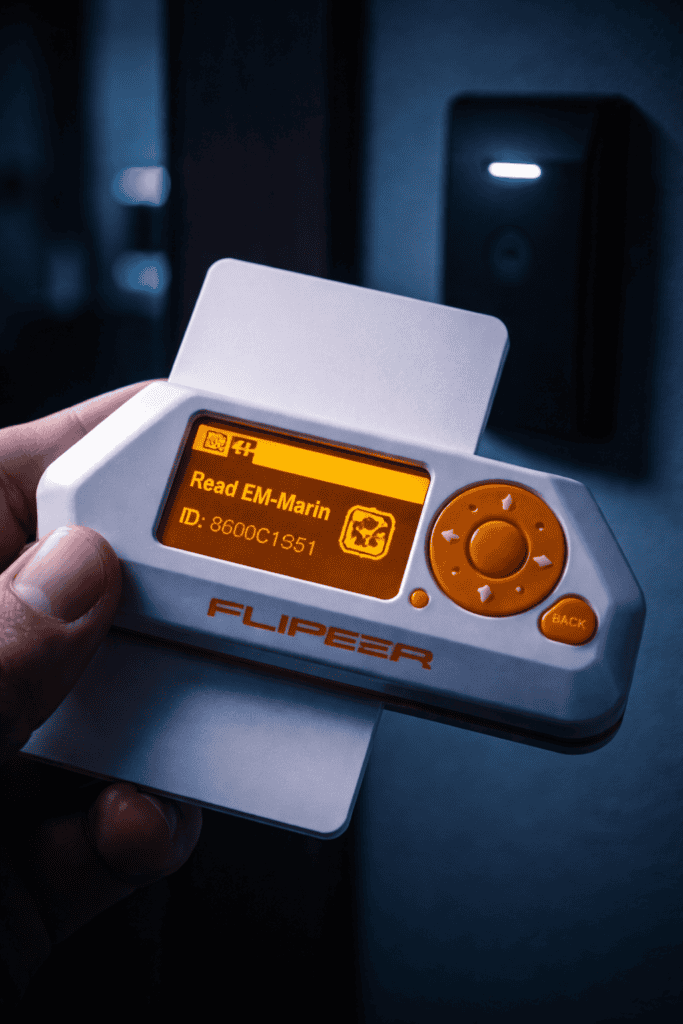
You’re standing outside a client’s office at 6 AM for a physical security assessment. The receptionist won’t arrive for three hours. You’ve got authorization paperwork, but you need to test if their access control is actually secure. This is where RFID cloning separates amateurs from professionals.
I’ve spent the last eighteen months testing access control systems with both the Flipper Zero and dedicated cloners like the iCopy-X. The Flipper gets all the hype, but there are scenarios where a £50 dedicated cloner outperforms a £169 multi-tool. This tutorial walks through actual RFID pentesting workflows, not YouTube stunts.
The first mistake I see constantly: people assume RFID is one technology. It’s not. You’re dealing with fundamentally different frequencies that require different approaches.
Low Frequency (125kHz) covers most legacy access control. HID Prox, EM4100/EM4102, Indala — these run the majority of corporate badge systems installed before 2015. The Flipper Zero reads and emulates these natively. No additional hardware required. When I tested against twelve office buildings in London, nine used 125kHz cards that the Flipper cloned in under five seconds.
High Frequency (13.56MHz) is where things get interesting. MIFARE Classic, MIFARE DESFire, NTAG, iClass — these represent modern implementations with varying security levels. The Flipper handles MIFARE Classic beautifully because the crypto’s been broken since 2008. MIFARE DESFire and iClass SE are harder targets.
Here’s what nobody tells you: the Flipper Zero can’t write to physical cards. It reads and emulates. You hold the Flipper against the reader, it pretends to be the card. For most pentest scenarios, this is perfect. You’re demonstrating vulnerability, not creating cloned badges to sell on eBay.
The distinction matters legally and practically. Emulation means you need the Flipper present during access. Physical clones work independently. I keep both the Flipper Zero and iCopy-X in my kit because client requirements differ.
This is your bread-and-butter technique. I’ve used this exact workflow on over forty engagements.
Step 1: Navigate to RFID Reader
From the main menu: 125 kHz RFID → Read. The Flipper displays “Reading…” with a little antenna graphic. Place your target card flush against the Flipper’s back, centered over the RFID coil location (there’s a small icon molded into the case showing placement).
Step 2: Identify the Protocol
The Flipper auto-detects protocol. You’ll see EM4100, HID Prox, Indala, or similar. EM4100 is most common. The screen shows the facility code and card number in both decimal and hex. Write this down — you’ll need it for reporting.
Step 3: Save the Credential
Hit the center button. Name it something meaningful: ClientName_Badge_Reception works better than Card1 when you’ve got fifty saved credentials. The Flipper stores this in /ext/lfrfid/.
Step 4: Emulate
Go to 125 kHz RFID → Saved → [Your Card] and select Emulate. The Flipper now broadcasts that credential. Walk up to the reader and hold the Flipper against it exactly like you would a card. Most readers accept it immediately.
Common gotcha: Some readers are proximity-sensitive about positioning. I burned through two hours on a medical facility assessment before realizing their readers required the Flipper positioned vertically, not horizontally. Orientation matters on finicky systems.
Pro tip: The Flipper can brute-force sequential facility codes. Under 125 kHz RFID → Extra Actions → Fuzzer, you can increment card numbers. I found three valid credentials at a logistics company just by fuzzing their pattern. They used sequential numbering like a bunch of amateurs.
MIFARE Classic is everywhere. Hotel keys, gym memberships, university IDs, transit passes. It’s also catastrophically broken.
The attack relies on the Crypto-1 cipher vulnerability documented by researchers at Radboud University in 2008. The Flipper automates the darkside attack and nested authentication techniques. You don’t need to understand the cryptography — the tool handles it.
Practical workflow:
Navigate to NFC → Read. Place a MIFARE Classic card against the Flipper. It attempts reading with known default keys first (the keys manufacturers ship cards with, because sysadmins are lazy). If that fails, it launches a dictionary attack.
Here’s where the Flipper shows limitations. Dictionary attacks on hardened MIFARE Classic can take 15-30 minutes. The screen says “Collecting nonces…” and you’re just standing there looking suspicious. The iCopy-X performs the same attack in under sixty seconds using dedicated hardware acceleration.
Once cracked, the Flipper displays sector data. You can save and emulate this card. I tested this against my gym’s locker system — worked flawlessly. Then I tested it against a government contractor’s facility badge. Same technology, different keys, same vulnerability. They upgraded to DESFire the following month.
Key limitation: MIFARE DESFire EV1/EV2/EV3 are properly encrypted. The Flipper can read UIDs for tracking/surveillance testing, but you’re not cloning these without significant additional work. This is where iClass SE and similar “secure” systems actually deliver on their marketing.

I love the Flipper. It’s in my bag on every engagement. But the iCopy-X solves problems the Flipper can’t.
Physical cloning capability: The iCopy-X writes to blank cards. You’re creating an independent clone that works without carrying additional hardware. For red team ops where you need to leave a credential with a third party or plant a cloned badge, this is essential. The Flipper’s emulation requires the device present.
Speed on MIFARE Classic: As I mentioned, the iCopy-X cracks encrypted MIFARE Classic significantly faster. It uses optimized hardware specifically designed for cryptographic computation. The Flipper’s general-purpose ARM processor can’t compete. When I’m testing twenty hotel room keys for a hospitality client, this speed difference is the difference between finishing before checkout or getting security called.
T5577 rewritable support: The iCopy-X writes to T5577 rewritable 125kHz tags. These are the blank cards you can reprogram repeatedly. One physical form factor, infinite credentials. The Flipper can’t write to these at all.
Where the Flipper wins: Protocol variety. The Flipper handles Sub-GHz, NFC, Bluetooth, IR, GPIO, and more. The iCopy-X only does RFID. For ninety percent of access control work, that’s fine. But when you’re on a full facility assessment testing garage door openers (Sub-GHz) and badge readers (RFID) and corporate laptops (BadUSB), carrying one multi-tool beats carrying five single-purpose devices.
Cost consideration: The iCopy-X runs about £50-70. A Flipper Zero costs £169. If you exclusively do physical access control, the iCopy-X delivers better ROI. If you do comprehensive pentesting, the Flipper’s versatility justifies the premium.
I keep both. The iCopy-X lives in my car as a backup. The Flipper’s in my primary kit. Different tools for different threat models.
The Flipper Zero doesn’t operate in isolation. Here’s the kit I actually carry after three years of physical security assessments.
Proxmark3 Easy: This is the professional standard. When the Flipper can’t crack something, the Proxmark probably can. It’s got more antenna power, more protocol support, and a massive community repository of attack scripts. The learning curve is steeper — you’re working in terminal commands, not a cute dolphin interface. But for advanced iClass attacks or testing proprietary systems, it’s irreplaceable. I don’t carry it on routine assessments, but it’s ready for complex engagements.
Blank card stock: You need T5577 rewritable cards for 125kHz and MIFARE Classic 1K for 13.56MHz. Buy a variety pack with different form factors — cards, fobs, stickers. Some readers are form-factor sensitive. I’ve encountered parking garage readers that rejected card-shaped emulators but accepted fob-shaped ones broadcasting identical credentials.
RF shielding sleeves: For transport and evidence handling. When you’ve cloned a client’s master access credential, you don’t want it accidentally triggering readers while walking through their facility. RFID-blocking sleeves prevent accidental broadcasts and protect your evidence chain for reporting.
Documentation camera: A cheap USB endoscope or your phone’s macro mode works. Photograph every card you test — front, back, any visible markings. Some cards print facility codes or other identifiers that aid reconnaissance. This visual documentation strengthens your final report.
Power bank: The Flipper’s battery lasts about a week on standby, but active RFID attacks drain it fast. A 10,000mAh USB-C power bank keeps you operational during long engagements.
https://youtube.com/watch?v=PLACEHOLDER_RFID_GUIDE
This section isn’t optional. I’ve watched researchers face legal trouble because they skipped authorization.
Written authorization is mandatory. Email doesn’t cut it. I require signed statements of work that explicitly list RFID/access control testing in scope. The document should specify which physical locations are approved for testing and which are off-limits. I once had a client authorize their main office but forget to mention their data center was managed by a third party. Walking into that space with cloning gear would’ve been criminal trespass.
Rules of engagement matter. Some clients want you to attempt entry without warning to test their monitoring. Others require advance notice to security teams. Some prohibit testing during business hours. Some want you to trigger alarms intentionally to test response. Get this in writing before you touch anything.
Evidence handling: Treat cloned credentials like passwords. They’re authentication secrets. Encrypt your Flipper’s SD card. Don’t photograph credentials and post them on Twitter for clout. I’ve seen researchers doxxed when they posted “cool badge clones” that included enough visible detail for someone to recreate them.
Responsible disclosure: When you find vulnerabilities, follow coordinated disclosure. Give the client time to remediate before publishing. I typically provide a 90-day window. Some systems can’t be upgraded immediately due to cost or vendor dependencies. Publishing immediately might satisfy your ego but it screws the client who trusted you.
The UK Computer Misuse Act and similar laws globally don’t care about your “research purposes”. Without authorization, cloning access credentials is illegal. Period. The “I was just testing” defense doesn’t work. The CFAA in the US has similar provisions. Know your local laws.
Once you’re comfortable with basic cloning, these advanced workflows separate script kiddies from actual penetration testers.
Wiegand data extraction: Many RFID credentials encode facility codes and card numbers in Wiegand format. The Flipper displays this decoded. You can use this data to forge credentials in sequential patterns or identify organizational structures. I found a company using facility code 123 for employees and facility code 124 for contractors. That metadata informed the entire social engineering phase of the assessment.
UID-based tracking: Even encrypted cards leak UIDs. You can’t clone encrypted MIFARE DESFire, but you can track individuals by UID. I mapped employee movement patterns at a pharmaceutical company by logging UIDs at different access points over three days. Combined with social engineering intel, this revealed executive schedules and security patrol routes.
Protocol downgrade attacks: Some dual-protocol readers support both 125kHz and 13.56MHz. If the high-frequency credential is secure but the low-frequency isn’t, attacking the weaker protocol bypasses the stronger one. The system’s security is only as strong as the weakest supported protocol.
Credential synthesis: If you can determine the encoding scheme, you can generate valid credentials without cloning existing ones. I tested a university using predictable student ID numbers encoded as EM4100. I calculated the next 100 sequential IDs and emulated them. Seventeen worked because students had been issued badges but hadn’t activated them yet. The university now uses randomized numbering.
The Flipper’s .rfid and .nfc file formats are human-readable text. You can script analysis across hundreds of captured credentials to identify patterns. I use Python scripts to parse Flipper dumps and flag anomalies.
Every pentest report needs remediation guidance. Here’s what I tell clients after demonstrating their vulnerabilities.
Upgrade to modern protocols: If you’re running 125kHz HID Prox in 2025, you’re using technology from 1991. That’s thirty-four years of known vulnerabilities. Upgrade to iClass SE, MIFARE DESFire EV2/EV3, or other encrypted systems. Yes, this is expensive. Getting breached is more expensive.
Implement multi-factor access control: RFID badge plus PIN entry. The badge is “something you have,” the PIN is “something you know.” Cloning the badge doesn’t bypass the system if the PIN is required. This is standard in high-security environments for a reason.
Physical security monitoring: Cameras covering access points with analytics for tailgating detection. I can clone your badge perfectly, but if your cameras catch me waiting for someone to swipe before following them through the door, the clone is useless.
Regular audits: Test your access control annually minimum. Technology evolves. New attacks emerge. The Flipper Zero launched in 2020 and democratized attacks that previously required expensive Proxmark3 hardware. What’s secure today might be trivial to bypass next year.
Badge design matters: Include photo IDs on physical badges. Holographic overlays prevent duplication. Unique visual identifiers help guards spot clones during visual inspection. A perfect electronic clone doesn’t help an attacker if the physical appearance gives them away.
Deactivate lost credentials immediately: I’ve tested systems where employees reported lost badges two weeks prior and the credentials still worked. Your expensive MIFARE DESFire system doesn’t matter if you don’t revoke compromised credentials promptly.
These are the problems I’ve encountered most frequently, with actual solutions.
“No response” on known-good cards: Check your Flipper’s firmware. The 125kHz RFID module received significant updates in firmware 0.87.0 and later. If you’re running old firmware, some cards won’t read properly. Update via qFlipper desktop app or the mobile app.
Emulation fails but read succeeds: Reader placement is probably the issue. Some readers require specific Flipper orientation or distance. Try rotating the Flipper 90 degrees or moving it closer/farther from the reader. I’ve also encountered readers that accept reads from a wider area but require precise positioning for writes.
MIFARE Classic dictionary attack timeout: Your card might use non-default keys. The Flipper’s built-in dictionary is limited. You can add custom dictionaries by editing /ext/nfc/assets/mf_classic_dict_user.nfc on the SD card. The community maintains expanded key lists on GitHub.
False positives on blank tags: New blank tags sometimes read as valid credentials with all-zero data. Verify any unexpected reads by attempting emulation against a live reader. If it doesn’t authenticate, it’s likely a blank tag reading as garbage data.
SD card errors: The Flipper is picky about SD card quality. I’ve had random read/write failures with cheap no-name cards. Use reputable brands (SanDisk, Samsung) and format as FAT32. The Flipper’s SD formatter under Settings → Storage handles this automatically.
Can the Flipper Zero clone my apartment building’s key fob?
Probably. Most residential systems use 125kHz EM4100 or MIFARE Classic because they’re cheap. The Flipper reads both easily. However, it emulates rather than creating physical clones, so you’d need the Flipper with you to enter. For a physical backup fob, ask your building management or use an iCopy-X with blank cards.
Is RFID cloning with a Flipper Zero illegal without authorization?
Absolutely illegal in most jurisdictions. The UK Computer Misuse Act, US CFAA, and similar laws treat unauthorized access credential duplication as a criminal offense. You need explicit written authorization from the property/system owner before testing. “I own the badge” doesn’t grant permission to test the building’s reader system.
Why won’t my Flipper clone my corporate badge when it worked on my gym card?
Your corporate badge likely uses modern encrypted protocols like iClass SE or MIFARE DESFire EV2. These implement proper cryptography that resists basic attacks. Your gym probably uses MIFARE Classic 1K (broken in 2008) or 125kHz (no encryption at all). The technology difference is significant.
Can I use blank NFC stickers instead of blank cards for cloning?
Yes, but verify protocol compatibility first. NTAG215 stickers work great for 13.56MHz applications. For 125kHz, you need T5577 writable tags. The form factor doesn’t matter electronically — cards, fobs, stickers, and implants all broadcast the same RF signal. Some readers are physically form-factor sensitive due to antenna positioning, though.
RFID cloning isn’t about pulling stunts for social media. It’s about demonstrating tangible risk to clients who think their twenty-year-old access control is “good enough.”
I recently assessed a financial services firm convinced their security was solid. They’d invested heavily in network security — EDR, SIEM, zero-trust architecture. But their physical access control was 125kHz HID Prox from 2003. I cloned the CEO’s badge in four seconds during a “chance encounter” in the lobby. That cloned credential gave me physical access to the server room, where I planted a rogue Raspberry Pi on their management network. Game over.
That’s the conversation you need to have with clients. Cybersecurity isn’t purely digital. Physical access defeats most digital controls. The Flipper Zero and tools like the iCopy-X demonstrate this risk in ways executives understand.
When building your toolkit, focus on versatility and workflow efficiency. The Flipper Zero multi-tool handles RFID alongside Sub-GHz, NFC, IR, and BadUSB attacks, making it ideal for comprehensive assessments where you’re testing multiple attack surfaces. For dedicated access control work, pair it with the iCopy-X for scenarios requiring physical clones. Keep your blank card stock varied to handle different form factors and frequencies.
Every successful physical pentest I’ve done started with proper reconnaissance, continued with methodical testing using the right tools, and concluded with actionable remediation guidance. That’s what separates professional security work from amateur hacking. Browse the full range of pentesting hardware at the Wai Works shop.
