
You’re running an exercise. Multi-site, geographically spread, comms go through a central relay. That relay is internet-dependent. Someone pulls the wrong plug , or more likely, the hotel Wi-Fi decides it’s done for the day , and your team is dark. Not degraded. Dark.
This is the exact scenario that pushed a lot of serious operators toward Meshtastic and LoRa-based mesh infrastructure in the first place. Decentralized, license-free in most jurisdictions, offline by design. The theory is sound. The execution depends entirely on the hardware you trust to run it.
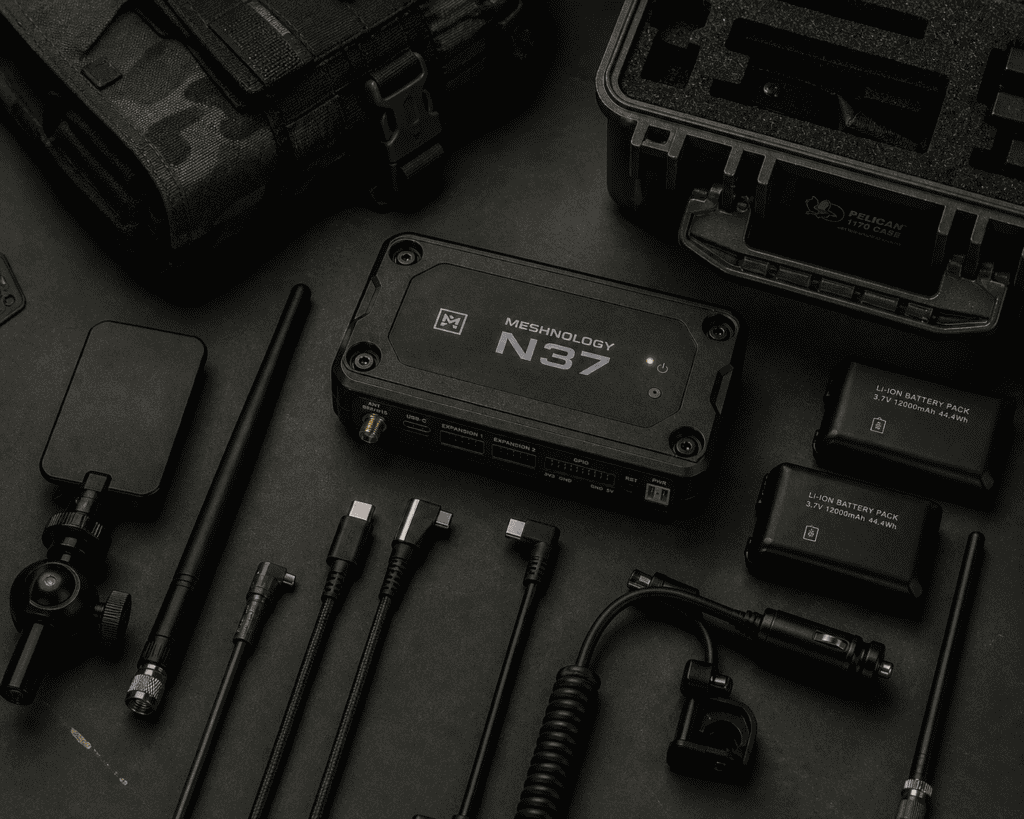
The Meshnology N37 is one of the more thoughtfully engineered entries in this space. It’s built around the idea that a tactical meshtastic node modular expansion shouldn’t require you to commit to a fixed configuration before you know what the field looks like. That’s not a marketing line — it’s a practical constraint that most fixed-form LoRa devices ignore entirely.
This is a setup guide. It’s also an honest look at where it earns its place and where you’ll still need to think carefully.
The N37 is a field-deployable LoRa node built on the Meshtastic firmware stack, designed with physical modularity as a first-class concern. Not an afterthought. The chassis accommodates interchangeable antenna connections, multiple power input options, and expansion headers that let you bolt on sensors, GPS modules, or secondary comms interfaces depending on the mission profile.
It targets the gap between consumer-grade Meshtastic devices — your T-Beam, your Heltec — and full commercial tactical radio platforms that cost more than a mid-range penetration testing laptop and come with export restrictions to match.
The LoRa tactical communication device category has gotten crowded recently, but most of what’s in it is either consumer hardware that happens to run Meshtastic firmware, or industrial IoT gear that wasn’t designed with humans carrying it in mind. The N37 is neither. It’s purpose-built for people who need reliable, reconfigurable mesh comms in environments where reliability isn’t guaranteed.
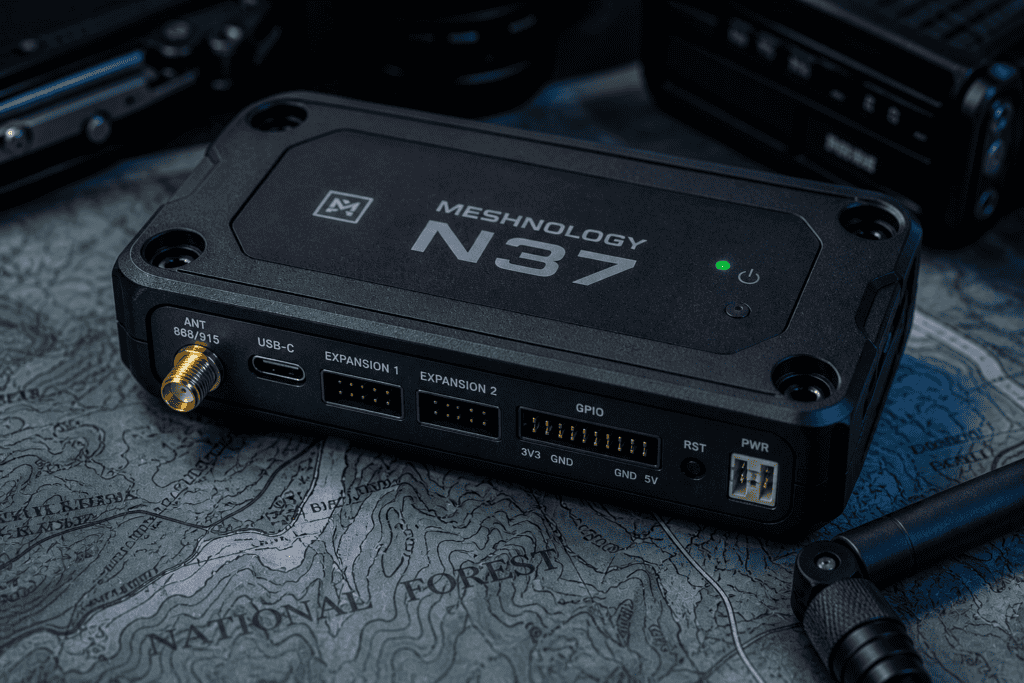
Out of the box, the N37 ships with default Meshtastic configuration. Before you do anything else — before you touch antenna selection, before you think about channel config — flash the latest stable firmware. Not because the factory firmware is broken, but because Meshtastic’s development cadence is aggressive and you don’t want to debug a field issue that was patched three releases ago.
Flashing is handled through the Meshtastic web flasher or via CLI with meshtastic --port /dev/ttyUSB0 --export-config first to back your settings, then the flash. Standard stuff. Do it over USB-C, not wirelessly — don’t introduce unnecessary variables before you’ve even started.
Once firmware is current, configure your region code before you key up. This isn’t optional. LoRa operates in license-exempt ISM bands, but those bands vary — 868 MHz in Europe, 915 MHz in the US, 433 MHz in parts of Asia. Running the wrong region setting doesn’t just reduce range, it potentially puts you outside legal operating parameters. Know where you are. Set it correctly.
Meshtastic’s default channel is PUBLIC_LONG_FAST and the PSK is effectively null. Every Meshtastic device in range can read your traffic. For a CTF or a casual comms test, maybe that’s fine. For anything resembling operational security, it’s not.
Set a custom channel name and a strong 256-bit PSK before you deploy. The N37’s configuration interface exposes this cleanly — via the Meshtastic Python CLI or the Android/iOS app over Bluetooth. Generate your PSK properly: python3 -c "import secrets; print(secrets.token_hex(32))" and don’t reuse keys across engagements. Basic tradecraft, but worth saying.
The modular meshtastic node architecture of the N37 means your channel config persists across hardware reconfigurations. Swap the antenna module, add the GPS header — your PSK stays put. That matters in the field when you’re reconfiguring under time pressure.
Here’s where the N37 earns or loses depending on how you use it.
The tactical meshtastic node modular expansion system on the N37 centers on three physical interfaces: the SMA antenna port (with an included adapter for IPEX/U.FL depending on your antenna choice), an expansion header for I2C/SPI peripherals, and a secondary power rail that accepts both USB-C and direct DC input in a range that covers most field battery packs without a converter.
For red team operations, the immediately useful expansion options are:
The cost is physical bulk. The N37 isn’t a T-Beam you drop in a jacket pocket. The modular chassis adds mass and volume. That’s a deliberate trade — modularity requires accommodation. Know what configuration you actually need before you build it out, because a fully expanded N37 is a different carry proposition than a base unit.

Let’s run through a realistic Meshnology N37 field setup scenario — multi-person red team engagement, mixed indoor/outdoor, no reliable internet infrastructure.
Before the engagement: flash firmware, configure region, set custom channel and PSK, test mesh connectivity with at least two nodes in the configuration you’ll actually be running. Don’t test with defaults and then reconfigure on-site. Test the real config.
Node placement matters more than people expect. Meshtastic’s mesh is store-and-forward — packets hop between nodes — but range between hops is real physics. LoRa at 915 MHz in a line-of-sight suburban environment can reach 3–5 km easily. Through a concrete building, you’re looking at significant attenuation. Plan your node placement like you’re planning RF coverage, because you are.
For indoor deployments, the N37’s ability to run on a small USB power bank changes the calculus. You can cache a node at an elevated position — top of a stairwell, above a drop ceiling if you have access — and extend your mesh indoors without needing a fixed power outlet. The power rail flexibility on the N37 is genuinely useful here, not a spec-sheet item.
A deployed LoRa node is a physical artifact. It has an RF signature. It can be found.
The Meshtastic firmware doesn’t transmit identifying information beyond what you configure — your node name, your GPS position if you enable it. But the RF transmission itself is detectable with the right equipment. LoRa’s spread-spectrum modulation makes it resistant to casual interception, but a motivated adversary with a spectrum analyzer and some patience will find your nodes.
During authorized physical engagements, this is mostly an academic concern. During red team ops where physical discovery of your infrastructure is a failure condition, it’s not. Minimize transmit power to what’s needed for reliable mesh operation. Reduce beacon intervals. Think about placement in terms of both RF coverage and physical concealment.
The N37’s configurable transmit power — accessible through standard Meshtastic config parameters — gives you the control here. Default transmit power is often higher than you need. Turn it down and test. You’ll usually find that shorter hops with lower power are more reliable than maxed-out power trying to span too much distance.
One N37 by itself is a radio. A network of them is infrastructure.
The tactical meshtastic node modular expansion capability becomes genuinely powerful when you’re thinking about the network, not the device. A base station N37 with a high-gain antenna on an elevated position, several carried N37s for mobile team members, and optionally a caching node left at a pre-planned location — that’s a resilient, encrypted, infrastructure-independent comms mesh that doesn’t touch the internet.
The LoRa tactical communication device use case for security teams isn’t just about the hardware. It’s about having a comms channel that operates on a completely separate layer from everything else in scope. During engagements where you’re testing network segmentation, credential handling, or physical security — having your team comms on an out-of-band mesh means you’re not running your coordination through the same infrastructure you’re actively attacking or assessing. That’s not a luxury. That’s basic operational hygiene.
MITRE ATT&CK’s coverage of wireless attacks (under the Network Effect category and related techniques) is a useful frame here — understanding how LoRa comms could theoretically be targeted helps you build the mesh with appropriate defensive thinking baked in from the start, rather than bolted on after the fact.

Honest assessment time.
The N37 is not a voice radio. Meshtastic is a text and telemetry mesh — if your team needs voice comms, you need a different tool alongside this, not instead of it. That’s not a knock on the N37, it’s a reminder that the modular meshtastic node architecture solves a specific problem. Know which problem you’re solving.
It’s also not a covert device in the way that phrasing sometimes implies. LoRa transmits on regulated spectrum. The node has physical presence. If your threat model includes adversaries actively hunting for RF emissions or conducting physical sweeps, a LoRa mesh is one layer, not the whole answer.
And the Meshtastic firmware, while genuinely impressive for an open-source project, has rough edges. The routing algorithm works well in small-to-medium meshes. It gets less predictable as mesh size scales. For most red team deployments — typically 4–12 nodes — this isn’t a practical limitation. But it’s worth knowing before you try to scale to 40 nodes across a large campus and wonder why packet delivery is inconsistent.
The Meshnology N37 fills a real gap. Not hypothetically — practically. The combination of Meshtastic’s proven mesh firmware, a chassis designed for field reconfiguration, and genuine power flexibility makes the tactical meshtastic node modular expansion approach viable in contexts where fixed-form LoRa devices aren’t.
It won’t replace every comms tool in your kit. Nothing should. But as an out-of-band, infrastructure-independent, encrypted mesh layer for team coordination — especially during physical assessments, extended red team operations, or any scenario where you need comms that survive the loss of whatever you’re testing — it earns its place.
Build it thoughtfully. Configure it properly before you need it. Test the actual config, not the defaults. And know what you’re asking it to do.
If you’re putting together a serious field kit around capable hardware like this, see what we carry , the selection is built for people who actually use this stuff, not people who read about it.
