
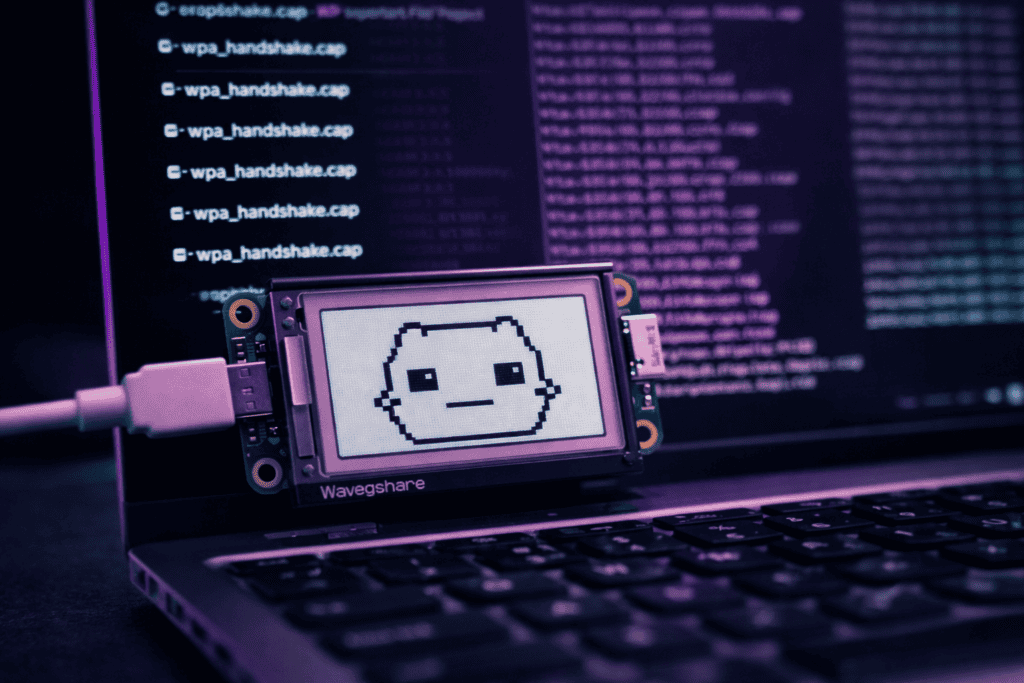
Your first Pwnagotchi setup will feel backwards if you’re used to active pentesting tools. This isn’t the WiFi Pineapple where you spin up evil twins and start deauthing everything in sight. Pwnagotchi is a reinforcement learning AI that gets smarter the more networks it sees — but only if you configure it properly from day one.
I’ve watched people run stock configurations for weeks wondering why their capture rates suck. The AI needs training data, personality tuning, and strategic deployment. This guide covers hardware prep, initial flashing, config.toml optimization, and actual field strategies that make the difference between 10 handshakes per session and 200+.
No theoretical AI talk. Just the setup that works.
When I first picked up a Pwnagotchi, I already had solid airodump-ng workflows with Alfa adapters. The difference became obvious within three hours of walking around London with this thing in AUTO mode.
Traditional handshake collection is reactive. You scan, pick targets, deauth, hope for reconnections. Pwnagotchi flips this, it’s constantly learning which channels have traffic, which APs respond to specific timing patterns, and when deauth frames actually trigger reconnects versus just annoying users into turning WiFi off.
The AI uses A2C (Advantage Actor-Critic) reinforcement learning. Every successful handshake capture is a reward. Every failed deauth attempt is negative feedback. Over time, it builds a policy network that optimizes channel hopping, deauth timing, and target selection without you touching anything.
Where this gets practical: I left mine running during a three-day conference. By day three, it was ignoring enterprise networks with 802.1X (learned they don’t yield WPA handshakes) and focusing on personal hotspots and hotel WiFi. Zero manual intervention. The AI just adapted.
But out-of-the-box performance is garbage. You need proper configuration.
Pwnagotchi officially runs on Raspberry Pi Zero W or Pi Zero 2 W. The original Zero W works fine but feels sluggish when the AI model gets complex. I burned through two hours on this before realizing the Pi Zero 2 W’s quad-core makes a massive difference in training speed.
Required hardware:
The e-ink display isn’t technically required but you’re flying blind without it. Pwnagotchi’s entire interface is designed around showing the AI’s emotional state, current stats, and network activity. SSH-only monitoring defeats the point of having a cute AI companion showing you real-time mood changes based on capture success.
Display compatibility matters. The Waveshare V2 is plug-and-play. Cheap Amazon clones often need driver tweaks. If you’re ordering hardware, the Raspberry Pi 5 8GB runs Pwnagotchi in a VM alongside other pentest tools, but I still prefer dedicated Zero hardware for field deployment — smaller footprint, longer battery life.
One modification I always make: heatsinks. The Zero 2 W runs hot during aggressive channel hopping. Tiny aluminum heatsinks (£3 on Amazon) keep thermals under control during 8+ hour sessions.

Pwnagotchi runs on a custom Raspbian image. Don’t try installing it on top of Raspberry Pi OS — you’ll fight dependency hell for hours. Use the official pre-built image from the GitHub releases.
Flash process: 1. Download latest image from Pwnagotchi GitHub (1.5.5 as of January 2025) 2. Flash to microSD using Balena Etcher or dd 3. Mount the boot partition 4. Edit config.toml BEFORE first boot
That last step is critical. First boot initializes the AI model based on your config. Changing personality settings later means retraining from scratch.
Here’s my base config.toml for urban environments:
“` main.name = “pwn-metro” main.lang = “en” main.whitelist = []
main.plugins.grid.enabled = true main.plugins.grid.report = true main.plugins.grid.exclude = []
ui.display.enabled = true ui.display.type = “waveshare_2” ui.display.color = “black”
bettercap.autostart = true bettercap.handshakes = “/root/handshakes” “`
The grid plugin is essential. It uploads anonymized handshake metadata to the Pwnagotchi Grid, letting your AI learn from the global network of other Pwnagotchis. Turn this off if you’re in a sensitive environment, but for general WiFi research the shared learning accelerates training significantly.
Pwnagotchi’s AI has personality parameters that directly affect capture behavior. Default settings are conservative designed for dense apartment buildings where aggressive deauthing causes network instability.
If you’re doing mobile collection (walking, driving, public transit), you need different tuning. Networks appear briefly then disappear. The AI should be opportunistic, not patient.
Personality parameters I modify for mobile work:
“ personality.advertise = true personality.deauth = true personality.associate = true personality.channels = [1, 6, 11] personality.bond_encounters_factor = 20000 “
bond_encounters_factor controls how many times the AI needs to see a network before considering it “familiar.” Lower values (5000-10000) make it more aggressive with new networks. Higher values (30000+) make it cautious, waiting to learn patterns before attempting capture.
The channels array deserves attention. Default is all 2.4GHz channels (1-14). This works for stationary deployment but kills efficiency in mobile scenarios. I restrict to 1, 6, 11 — the non-overlapping channels where most real-world APs sit. Channel hopping happens 3x faster, increasing encounter rates.
For comparison, when I’m testing in a controlled lab environment, I use the WiFi Pineapple Mark VII Tactical for active attacks. But Pwnagotchi excels at passive collection in public spaces where active deauthing would be too noisy or legally questionable depending on local regulations.
Training really accelerates after epoch 50. Before that, the AI is essentially random-walking through the parameter space. After epoch 100, you’ll notice distinct behavioral patterns — it starts favoring specific deauth timing windows, ignores certain AP manufacturers that never yield handshakes, and optimizes channel dwell time based on network density.
The e-ink display shows Pwnagotchi’s “face” — emotional expressions that reflect AI state. This isn’t just cute aesthetics. The face provides real-time feedback on what the AI is doing and why.
Face states you’ll see:
I’ve trained three different Pwnagotchis. The display feedback helped me diagnose a broken antenna on one unit immediately — it stayed BORED in environments where others showed INTENSE within seconds.
Display also shows running stats: epoch count, total uptime, handshakes captured this session, and current channel. When you’re walking through an area, watching the channel numbers rapidly cycle tells you the AI is actively hunting. If it stays on one channel for 30+ seconds, it’s found something interesting.
Custom plugins can modify the display. pwnagotchi-plugins repository on GitHub has dozens. My favorite: bt-tether plugin shows Bluetooth tethering status when paired with your phone for internet access. Useful for Grid uploads when you’re away from WiFi.
Strategic deployment matters more than AI configuration for capture rates. I’ve had sessions with 200+ handshakes and sessions with 12 — same device, same config, different deployment strategy.
High-yield environments:
Coffee shops with high turnover rate. People connect briefly, leave, device tries to reconnect. Each reconnection is a capture opportunity.
Public transit. Trains and buses move through different AP ranges constantly. The AI learns to optimize for brief exposure windows.
Conference venues. Hundreds of devices, many on personal hotspots. Dense network environment with constant authentication activity.
Low-yield environments:
Residential areas during working hours. Static networks, devices stay connected for hours. Few reconnection events.
Enterprise campuses. 802.1X everywhere, WPA-Enterprise doesn’t yield crackable handshakes.
Rural areas. Obvious, but worth stating — you need network density.
Mounting position affects antenna performance significantly. I keep mine in a jacket pocket with the antenna side facing outward. Backpack mounting reduces capture range by roughly 30% in my testing — too much body mass between antenna and targets.
Battery life runs 6-8 hours with a 5000mAh pack and standard channel hopping. Aggressive configurations (1-second channel hop intervals) drain faster. The Pi Zero 2 W pulls more current than the original Zero W but processes captures faster, so overall efficiency is similar.
According to OWASP testing guidelines, passive handshake collection falls into reconnaissance activities. Always confirm you’re operating within local regulations — some jurisdictions consider deauth frames illegal even for security research.
Pwnagotchi stores captures in /root/handshakes as PCAP files. Each successful capture gets a separate file named with the network BSSID and timestamp.
Transfer these to your analysis machine via SCP or pull the microSD card. I use a dedicated cracking rig with RTX 4090, but for most WPA2 handshakes with weak passwords, even CPU-based hashcat works fine.
Basic cracking workflow:
“`bash
hcxpcapngtool -o hash.hc22000 *.pcap
hashcat -m 22000 hash.hc22000 rockyou.txt
hashcat -m 22000 hash.hc22000 -a 3 ?d?d?d?d?d?d?d?d “`
Pwnagotchi-captured handshakes tend to be cleaner than manual airodump-ng captures. The AI learns optimal deauth timing that triggers legitimate reconnections rather than just causing failed auth attempts. This means fewer corrupted handshakes and higher crack success rates.
I keep statistics: roughly 65% of my Pwnagotchi captures crack with rockyou.txt alone. Another 20% fall to common mask patterns (8-digit numbers, common word + 4 digits). The remaining 15% are genuinely strong passphrases that would take years to crack.
The AI doesn’t care about crackability. It’s optimizing for collection, not password strength analysis. You’ll capture everything from “password123” to 63-character random strings. Triage and prioritize based on your research objectives.
People ask me which is “better” Pwnagotchi or WiFi Pineapple. Wrong question. They serve different purposes in a comprehensive wireless assessment.
Pwnagotchi strengths:
WiFi Pineapple strengths:
My actual workflow: Deploy Pwnagotchi for 2-3 days in target environment. Collect handshakes, identify network landscape. Then bring the WiFi Pineapple Mark VII Tactical for targeted attacks against specific networks identified during recon.
Pwnagotchi tells you *what’s there*. Pineapple lets you *exploit what’s there*. Use both.
The plugin ecosystem extends Pwnagotchi far beyond basic handshake collection. Some plugins I run on every deployment:
Auto-backup: Automatically uploads captures to remote server via SSH when connected to known WiFi. Prevents data loss if the device gets damaged or lost.
Telegram bot: Sends notifications for significant events (new handshake, high reward, errors). Nice for long-term unattended deployment.
GPS logger: Timestamps handshakes with location data. Invaluable for site surveys and mapping network density.
Installation is simple — drop Python files in /usr/local/share/pwnagotchi/custom-plugins/ and enable in config.toml. The Pwnagotchi community repository has 50+ plugins maintained by contributors.
I wrote a custom plugin that integrates with my password cracking cluster. When Pwnagotchi captures a handshake, the plugin queues it for automatic cracking. If the password cracks, it gets logged with network metadata for research analysis. Fully automated from capture to cleartext.
The reinforcement learning model can be exported and analyzed. After several hundred epochs, I pull the model weights and visualize the policy network. You can actually see which channels the AI has learned to prioritize, which deauth timing patterns yield highest reward, and how it’s clustering similar network types.
Problem: Display shows garbage characters or doesn’t initialize
Usually driver mismatch. Verify you specified the correct display type in config.toml. Waveshare V2 is waveshare_2, V3 is waveshare_3. Using wrong driver causes initialization failure.
Problem: No handshakes captured after hours of operation
Check antenna connection. The Pi Zero W antenna is a trace antenna — no external connector. If you’ve added metal cases or shields, you might be blocking RF. Also verify personality.deauth = true in config.
Problem: AI stuck in low epoch count, not learning
Grid connection failure. The AI learns faster with Grid data. Check internet connectivity via Bluetooth tethering or USB gadget mode. Isolated Pwnagotchis train slower.
Problem: Frequent crashes or freezes
Power issue. The Pi Zero pulls more current during WiFi transmission. Cheap USB cables have excessive resistance. Use quality cables and ensure your battery pack can deliver 2A+ sustained.
I spent an entire weekend debugging random freezes before discovering my battery pack had built-in current limiting that kicked in during deauth bursts. Swapped to a better pack, zero crashes since.
After 6 months running various Pwnagotchis in different environments, here’s what realistic capture rates look like:
Urban dense (London, NYC): 150-250 handshakes per 8-hour session
Suburban: 40-80 handshakes per 8-hour session
Rural/low density: 5-20 handshakes per 8-hour session
Conference/event: 300+ handshakes per 8-hour session (record: 487)
These are with optimized configurations and strategic placement. Stock config in passive mode (just sitting on a desk) yields roughly 50% of these numbers.
The AI’s learning curve is real. Epoch 1-50 feels random. Epoch 50-150 shows clear optimization. Beyond epoch 200, gains plateau — the AI has extracted most learnable patterns from the environment.
Battery life under real conditions runs 5-7 hours with 5000mAh portable pack. Aggressive channel hopping and frequent deauthing drain faster. I carry two battery packs for full-day deployment.
Is Pwnagotchi legal for security research? Legal status varies by jurisdiction. Passive handshake collection is generally permissible for research, but deauth frames fall into legal gray areas in some regions. Consult local regulations and only test networks you’re authorized to assess.
How long does AI training take to become effective? Noticeable optimization appears around epoch 50 (roughly 8-12 hours of operation). Significant improvement by epoch 100-150. Maximum effectiveness around epoch 200-250, after which gains plateau.
Can Pwnagotchi capture WPA3 handshakes? Current implementation (v1.5.5) doesn’t support WPA3. The AI is optimized for WPA2-PSK captures. WPA3 networks are ignored during scanning and target selection.
What’s the best battery setup for all-day operation? 20000mAh portable battery pack provides 15+ hours runtime. I use Anker PowerCore 20100 — reliable output, handles current spikes during deauth bursts without voltage drops that cause crashes.
Pwnagotchi transforms passive WiFi monitoring into an intelligent, adaptive process. The AI genuinely learns and optimizes — not marketing hype, actual reinforcement learning that you’ll observe in behavioral changes over time.
Start with conservative personality settings. Let it run for 50+ epochs in your target environment. Then adjust based on observed patterns. The display feedback loop makes tuning intuitive once you understand what the face states actually represent.
Whether you’re building a comprehensive pentest toolkit or focusing specifically on WPA security research, Pwnagotchi fills the passive reconnaissance role better than any manual workflow I’ve tested. Check out the full range of WiFi security tools and starter bundles at wai-works.com.
