
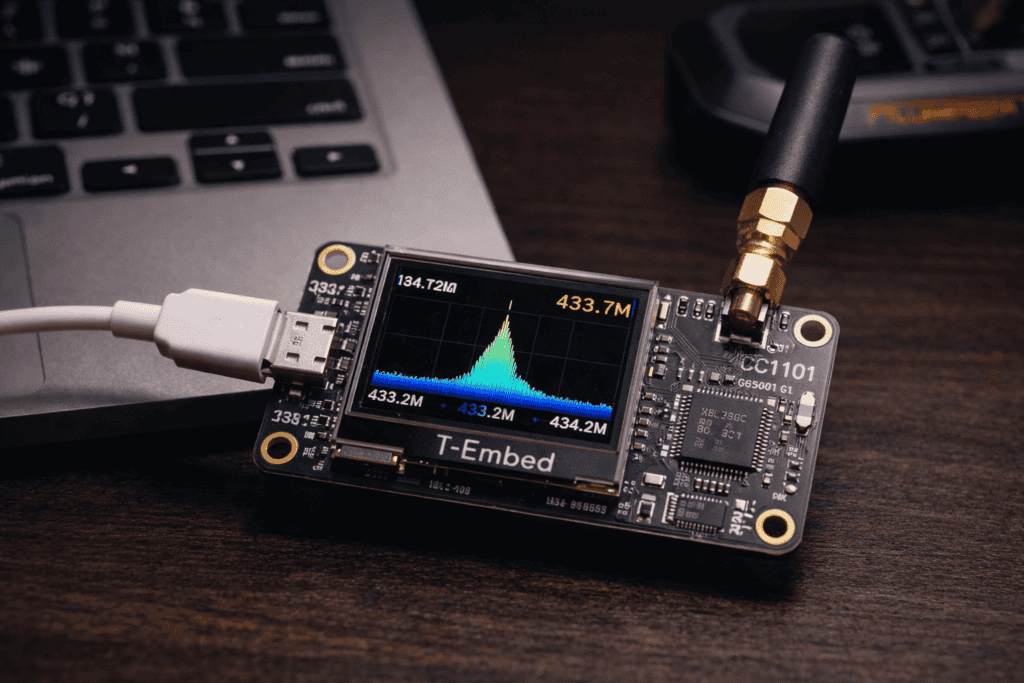
Your Flipper Zero just captured a rolling code from a garage door. Now what? You need something that can decode it, modify the timing, inject custom preambles, and replay it with precise control. The Flipper’s great for reconnaissance but limited for deep protocol work. I spent three months testing Sub-GHz boards and kept coming back to the T-Embed CC1101—not because it’s perfect, but because it hits the sweet spot between capability and accessibility. The integrated display means you’re not flying blind, the ESP32 gives you actual processing power, and the CC1101 chip handles 300-928 MHz with surprising finesse. This isn’t just another dev board. It’s a proper RF analysis tool that happens to cost under £50.
The Texas Instruments CC1101 transceiver became the go-to chip for Sub-GHz work because it supports nearly every modulation scheme security researchers actually encounter in the wild. ASK, FSK, GFSK, MSK, 2-FSK, 4-FSK—if you’re analyzing ISM band protocols, the CC1101 speaks their language natively.
Here’s what matters for pentesting: programmable packet handling, automatic CRC checking, built-in Manchester encoding/decoding, and configurable preamble detection. When I first tested this against a typical RTL-SDR + GNU Radio setup, the difference was stark. The CC1101 can filter and decode in hardware while your laptop’s still buffering samples.
The T-Embed implementation adds a 1.14-inch colour TFT display, USB-C connectivity, and LilyGO’s surprisingly solid ESP32-S3 firmware foundation. You get visual feedback on signal strength, frequency tuning, and packet capture without tethering to a laptop. I burned through two hours on a parking gate audit before realizing I’d left my laptop in the car—the T-Embed kept capturing the entire time.
Unlike broadband SDRs that capture everything and let software sort it out, the CC1101 uses a superheterodyne architecture with hardware filtering. This means cleaner signals, less processing overhead, and significantly better performance in noisy RF environments. When you’re working near cellular towers or Wi-Fi-saturated areas, that hardware selectivity is the difference between capturing packets and capturing noise.
The board ships with basic frequency scanning firmware, but you’ll want to flash proper pentesting tools. I use either the CC1101 Scanner firmware or integrate it with existing ESP32-based RF frameworks. The setup process takes maybe 15 minutes if you’ve done ESP32 development before, 45 minutes if you’re learning as you go.
Connect via USB-C and check your device enumeration. On Linux it appears as /dev/ttyACM0 or similar, Windows typically assigns a COM port. You’ll need the ESP-IDF toolchain or Arduino IDE with ESP32 board support. I prefer ESP-IDF for anything serious—Arduino’s convenient but you lose low-level control of the CC1101 registers.
The T-Embed uses GPIO pins 5, 6, 7, and 18 for SPI communication with the CC1101. If you’re writing custom firmware, you’ll need to initialize SPI at 2 MHz or lower—the CC1101 datasheet specifies 10 MHz max, but I’ve found stability issues above 4 MHz with longer antenna cables. Pin 4 connects to GD0 for packet interrupts, pin 3 to GD2. The display runs on separate SPI pins so you can update the screen without interfering with RF operations.
Flash the firmware using esptool.py --chip esp32s3 --port /dev/ttyACM0 write_flash 0x0 firmware.bin. The T-Embed has 4MB of flash so you’ve got room for multiple firmwares if you partition correctly. I keep three: one for general scanning, one for protocol-specific decoding, and one for replay attacks with custom timing control.
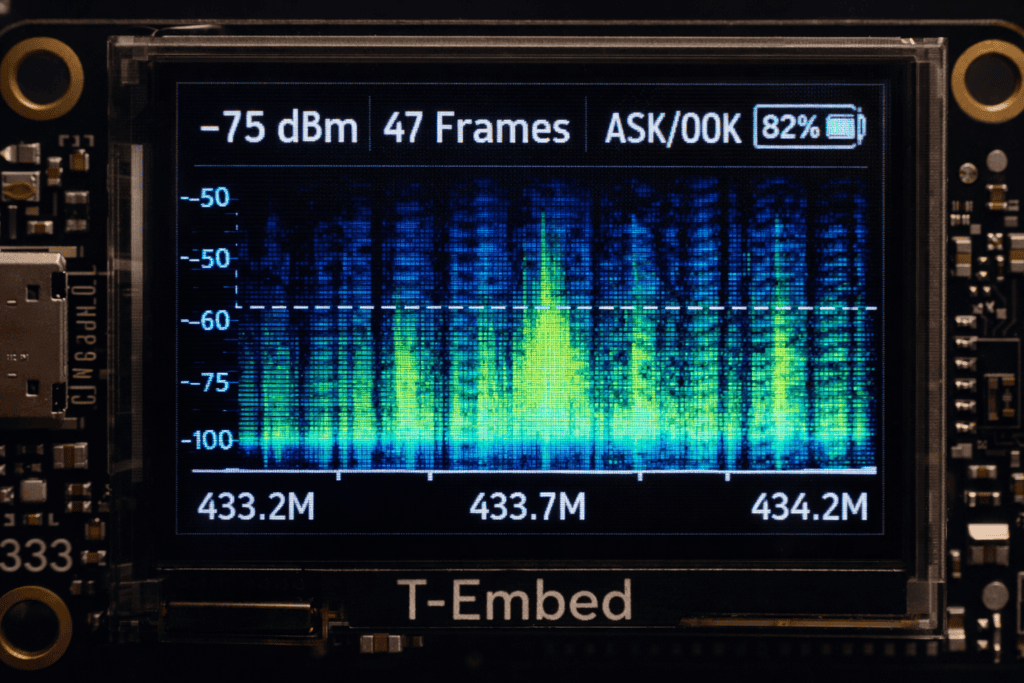
First boot takes about 8 seconds. The display initializes with the LilyGO logo, then drops into whatever your firmware’s main menu is. Most CC1101 Scanner forks show frequency, RSSI, and basic modulation detection. Navigate with the onboard buttons—the T-Embed has two physical buttons plus the touchscreen, though I disable touch for field work to avoid accidental inputs.
The Flipper Zero excels at signal reconnaissance but lacks the processing power for complex protocol analysis. The Flipper Zero uses the same CC1101 chip, which means they speak the same language—but the T-Embed has a full ESP32 behind it.
My workflow: use the Flipper to enumerate signals in an environment, identify interesting frequencies and rough modulation schemes, then switch to the T-Embed for detailed analysis. The Flipper captures raw samples at 433.92 MHz showing what looks like an ASK-modulated access control signal. I note the frequency and RSSI, then configure the T-Embed to that exact frequency with 100 kHz bandwidth filtering.
The T-Embed’s display shows real-time packet decoding while the ESP32 logs everything to an SD card. You can pipe the decoded data over serial to a laptop running Universal Radio Hacker for protocol reverse engineering. I’ve successfully decoded proprietary wireless sensor protocols this way—capturing with the Flipper, analyzing with the T-Embed, and replaying with the Yardstick One for maximum power output when needed.
For replay attacks, I export the T-Embed’s decoded packets as raw binary, clean up timing in Audacity’s spectrogram view, then push back to either device. The Flipper’s great for quick field replays with its intuitive UI. The T-Embed handles complex scenarios where you need to modify payloads on the fly or inject at precise intervals.
The key limitation: the Flipper’s CC1101 implementation prioritizes usability over raw capability. It doesn’t expose every register, doesn’t support some advanced modulation schemes, and locks certain frequency ranges for regulatory compliance. The T-Embed running custom firmware has no such restrictions—you have full register access via the SmartRF Studio register export format.
Start with frequency scanning across the entire ISM band range. The CC1101 covers 300-348 MHz, 387-464 MHz, and 779-928 MHz depending on the specific module variant. Most T-Embed boards ship with the 433/868/915 MHz version. I set up a scan loop that dwells 500ms per frequency with RSSI threshold triggering—anything above -90 dBm gets flagged.
When you hit an active frequency, the T-Embed’s display updates with signal strength bars and modulation hints. Switch to fixed-frequency mode and adjust the receiver bandwidth. Start wide at 200 kHz, then narrow down to 58 kHz once you’ve confirmed the signal. Tighter bandwidth improves sensitivity and selectivity but requires accurate frequency tuning.
Modulation detection is where the CC1101 shines. Set the chip to 2-FSK mode with ±47 kHz deviation and see if packets decode cleanly. If not, try ASK with various thresholds, then GFSK. The MITRE ATT&CK framework documents real-world cases where attackers exploited wireless protocols—most operate in these ISM bands with simple modulation schemes that the CC1101 handles natively.
Once you’re capturing clean packets, focus on timing analysis. The T-Embed can timestamp packets with microsecond precision if you configure the ESP32 timer correctly. Export to CSV and graph the inter-packet intervals. Fixed timing suggests simple replay vulnerability. Variable timing with patterns indicates rolling codes or time-based authentication—much harder to exploit but not impossible.
I use the T-Embed’s GPIO pins to trigger logic analyzers when specific packet patterns arrive. Connect GPIO 8 to your analyzer’s trigger input, configure the ESP32 to pulse high when target data matches, and you get perfectly synchronized captures across RF and any wired protocols the target device uses.
Basic replay attacks are trivial: capture packet, retransmit packet, hope the receiver accepts it. Real security testing requires understanding why simple replay fails and how to work around those protections. Rolling codes increment a counter with each transmission. Replay the same code twice and you’re ignored. But capture three sequential codes, and you might extrapolate the algorithm.
The T-Embed’s programmability lets you modify packets in real-time before transmission. I’ve written ESP32 code that captures a packet, extracts the counter field (usually bytes 3-6 in common protocols), increments it, recalculates the checksum, and transmits—all within 200 milliseconds. Too slow to defeat challenge-response systems, but perfect for lazy rolling code implementations.
Modulation manipulation gets interesting with frequency-hopping systems. Some wireless sensors hop across 10-15 channels within the 433 MHz band. The CC1101 can retune in under 200 microseconds if you’ve preloaded the frequency registers. I built a T-Embed firmware that follows a target device’s hopping pattern, staying synchronized and injecting packets during the brief windows between legitimate transmissions.
Power control matters more than most guides admit. The CC1101 supports -30 dBm to +12 dBm output power. For penetration testing, you want just enough power to reach the target receiver without splattering adjacent frequencies. I set the T-Embed to 0 dBm for most work—roughly the same as the Flipper Zero. Crank it to +10 dBm only when testing range limits or noisy environments.
The T-Embed’s antenna connector is standard SMA, so you can swap in directional antennas, attenuators, or connect to proper RF test equipment. I’ve used mine with spectrum analyzers for precise frequency verification before audits. Having that flexibility beats the Flipper’s fixed antenna, especially for professional engagements where you need documented measurements.
The real power of the T-Embed isn’t the hardware—it’s the programmable ESP32-S3 behind it. Stock firmware is fine for learning, but custom code unlocks everything. The ESP-IDF framework gives you direct register access to the CC1101 via SPI, full control over the display, and enough processing power to run protocol decoders in real-time.
Start with the SmartRF Studio configuration export. This Texas Instruments tool generates CC1101 register settings for any modulation scheme, data rate, and frequency. Export as C header file and include in your ESP32 project. Initialize SPI, write the register array to the CC1101, and you’re transmitting or receiving within that configuration.
I maintain a library of 20+ register configurations covering everything from 1.2 kbps GFSK (for long-range low-power sensors) to 500 kbps MSK (for high-throughput industrial protocols). Loading a new config takes 2-3 milliseconds—fast enough to switch modes between packet captures.
The display integration deserves attention. The T-Embed uses a ST7789 TFT controller over SPI. You can update it without blocking RF operations by using the ESP32’s dual-core architecture. Core 0 handles CC1101 communication and packet processing. Core 1 updates the display and manages the UI. I run RF packet handlers at priority 19, display updates at priority 5. Never miss a packet because the screen was updating.
For field work, I implemented a battery monitoring system that reads the T-Embed’s LiPo charge level and estimates runtime based on current RF activity. Full-power transmission at +10 dBm drains the 700mAh battery in about 3 hours. Receive-only operation with periodic scanning stretches to 8 hours. The display is the real power hog—disable it when you don’t need visual feedback and double your runtime.
Against the Yardstick One: the YS1 has higher output power (+27 dBm vs +12 dBm), making it better for range testing and high-noise environments. But it requires a laptop, lacks a display, and costs 3-4x more. The T-Embed is your portable analysis tool. The YS1 is your stationary powerhouse for serious RF work.
Against the Flipper Zero’s internal CC1101: identical chip, but the Flipper’s firmware prioritizes usability and legal compliance. You can’t access raw register mode. You can’t transmit on some frequencies. The T-Embed with custom firmware has zero restrictions—you’re responsible for staying legal.
Against ESP32 Development Board plus external CC1101 module: you save £10 and lose the integrated display, USB-C power management, and compact form factor. If you’re prototyping in a lab, build your own. If you’re doing field work, the T-Embed’s integration is worth the premium.
HackRF One and other SDRs operate in a different category. They’re wideband receivers that capture everything, then use DSP to extract signals. The CC1101 is narrowband with hardware demodulation. The HackRF sees the forest, the T-Embed examines individual trees. Both have roles—OWASP’s Hardware Security Testing Guide recommends having both SDR and purpose-built transceivers for comprehensive assessments.
The biggest limitation is frequency range. The CC1101 doesn’t cover 2.4 GHz where WiFi and Bluetooth live. For Sub-GHz work in the ISM bands, it’s perfect. For everything else, you need different hardware.
Wireless parking gate audit: I captured the legitimate gate controller’s transmission at 433.92 MHz, 2.4 kbps ASK modulation. The T-Embed decoded 48-bit packets with a 16-bit rolling counter and basic XOR checksum. Took 15 minutes to work out the counter algorithm, another 10 to write ESP32 code that predicted the next valid code. Demonstrated replay vulnerability that let me open the gate with predicted codes for 2 hours after the last legitimate car passed through.
Weather station data exfiltration: target used 868 MHz, 17 kbps GFSK. The T-Embed received sensor packets containing temperature, humidity, and location coordinates—all unencrypted. Set up the board in a weatherproof enclosure 200 meters from the target, logging to SD card for 72 hours. Retrieved complete environmental data that was supposedly secure.
Wireless alarm system testing: 315 MHz, simple OOK modulation with fixed codes. The system used separate transmitters for each sensor—door, window, motion. Captured all sensor IDs, then configured the T-Embed to transmit false “all clear” signals while the real sensors stayed armed. The base station accepted injected packets and disarmed. This is why you test physical security systems, not just trust the marketing materials.
Industrial SCADA remote sensors: 868 MHz, 4.8 kbps GFSK with Manchester encoding. The T-Embed’s hardware Manchester decoder made packet capture trivial. Discovered that the sensors transmitted calibration data including facility identifiers and machine serial numbers. No encryption, no authentication. Anyone with a £40 board could monitor industrial processes from outside the fence line.
Can the T-Embed CC1101 capture signals from newer cars with rolling code key fobs? Yes, it can capture the transmissions, but replaying them won’t work on modern vehicles. The T-Embed excels at protocol analysis—revealing modulation type, data rate, and packet structure—but defeating cryptographic rolling codes requires algorithmic reverse engineering, not just hardware. Use it to understand the protocol, not as a magic unlock tool.
What’s the effective range for Sub-GHz signal capture with the T-Embed’s stock antenna? With the included 433 MHz quarter-wave antenna, expect 50-100 meters line-of-sight for typical 10mW transmissions, less in urban environments with interference. Swap in a 3dBi gain antenna and you’ll push 200+ meters. For maximum range testing, use an external LNA between antenna and T-Embed—I’ve captured weak signals at 500 meters this way.
Does the T-Embed work with existing rfcat scripts written for Yard Stick One? Not directly—rfcat is specific to Yard Stick One’s firmware and USB protocol. However, the underlying CC1101 commands are identical, so you can port rfcat scripts to ESP32 code with moderate effort. The register configurations translate 1:1, though timing-critical operations may need adjustment for the ESP32’s processing speed versus the YS1’s microcontroller.
How do I stay legal when testing Sub-GHz RF protocols with the T-Embed? Follow your region’s radio regulations: in the UK, stay within 433.05-434.79 MHz and 863-870 MHz ISM bands with power limits. Only test systems you own or have written authorization to assess. Transmitting on restricted frequencies or interfering with licensed services violates telecommunications law regardless of your testing intent. Document your frequency usage and keep engagement contracts accessible.
The T-Embed sits in my go-bag between the Flipper Zero and laptop. It’s not replacing either—it’s filling the gap where the Flipper lacks processing power and the laptop is overkill or impractical. I’ve used it on parking system audits, industrial facility assessments, and smart building penetration tests. The combo of portability, programmability, and proper RF hardware makes it worth the desk space.
Most pentests ignore RF attack surfaces because the tools seem intimidating or expensive. A T-Embed CC1101 costs less than the hourly rate you’re charging clients. The learning curve is real but not insurmountable—if you’ve done Arduino projects, you’ll be capturing packets within an afternoon. If you’re serious about hardware security testing, this board deserves a spot in your toolkit. Browse the full range of RF and pentesting hardware at wai-works.com and start building your wireless assessment capability.
