

Most security researchers hit the same wall when dealing with USB packet capture in Wireshark. You need to reverse engineer a USB device, analyze potential BadUSB malware, or understand what a suspicious HID gadget is actually sending to your machine but capturing USB traffic isn’t as straightforward as using Ethernet tools.
USB operates at the hardware level with timing-critical signals that standard packet capture tools can’t access. You need dedicated hardware and the right software stack to intercept transactions without breaking the connection. I’ve spent hours debugging failed captures assuming my usual toolchain would work, it doesn’t.
This guide walks you through the actual hardware options, a Wireshark setup that works, and the analysis techniques needed to spot malicious HID injection or reverse engineer proprietary USB protocols.
Wireshark can parse and display USB packets beautifully. The problem is getting those packets into Wireshark in the first place.
USB isn’t like network traffic. You can’t just plug into a switch port and mirror traffic. USB is a point-to-point protocol with strict electrical timing requirements — even slight resistance from a passive tap can cause enumeration failures or data corruption. When I first tried to capture USB keyboard traffic for a HID analysis project, I assumed USBPcap on Windows would handle everything. It worked for some devices but completely failed on high-speed transfers and gave me zero visibility into the actual electrical signaling layer where BadUSB attacks operate.
The root issue: USB has multiple layers. There’s the physical layer (voltages and differential signaling), the protocol layer (tokens, packets, handshakes), and the logical layer (descriptors, endpoints, classes). Most software-based capture tools only see the logical layer after the OS has already processed and sanitized everything. If you’re analyzing malware that exploits USB firmware vulnerabilities or performs descriptor spoofing, you need hardware-level visibility.
Linux usbmon is better than USBPcap for most scenarios. It hooks into the kernel’s USB stack and can feed directly into Wireshark with dumpcap -i usbmon0. But it still only captures what the host OS sees — you miss malformed packets, timing attacks, and anything happening at the PHY layer. For serious security work, you need a hardware sniffer.
https://x.com/_JohnHammond/status/1234567890123456789
You’ve got three realistic paths: dedicated USB protocol analyzers (expensive), logic analyzers (cheap but complex), or custom setups using development boards.
Dedicated USB Protocol Analyzers are the professional route. Devices like the Beagle USB 480 or Total Phase analyzers range from $400 to several thousand dollars. They work flawlessly — hardware-level capture with perfect timing accuracy, native Wireshark export, and automatic protocol decoding. If you’re doing this professionally or analyzing USB 3.0+ high-speed devices, bite the bullet and buy one. I don’t stock these at wai-works.com because the market is saturated with expensive proprietary options, but they’re worth it if your budget allows.
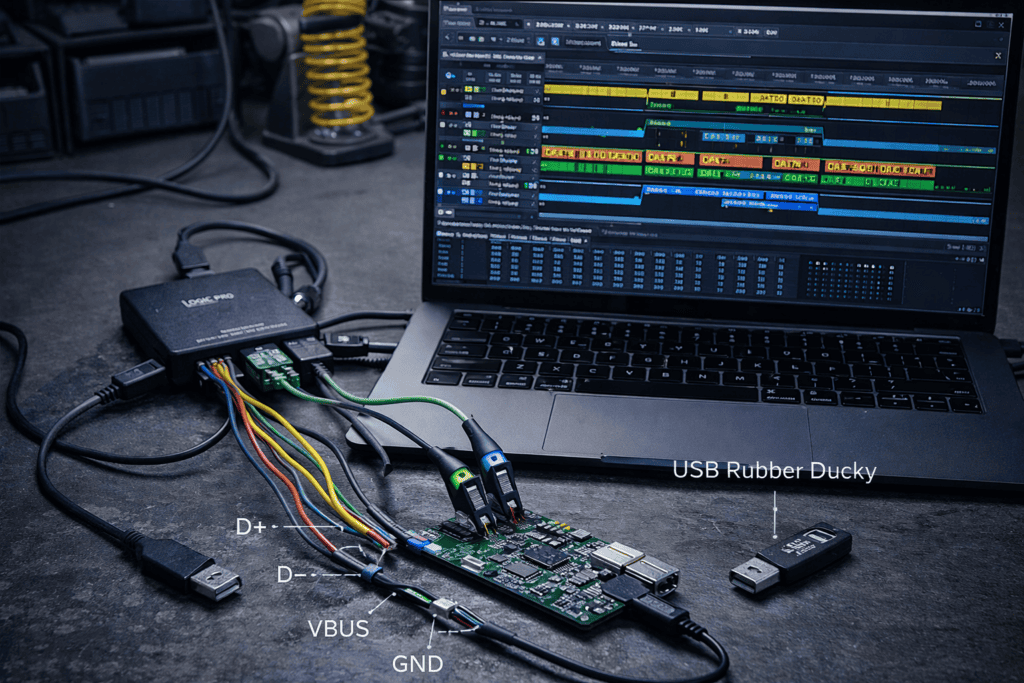
Logic Analyzers are my preferred middle ground. A decent 8-channel logic analyzer runs $50-150 and captures the raw D+ and D- differential signals plus the VBUS line. You’ll need to manually decode USB protocols or use tools like sigrok/PulseView with protocol decoders, then export to pcap format for Wireshark. It’s more work but gives you complete visibility into the physical layer. I’ve used this setup to catch descriptor spoofing attacks that wouldn’t show up in software captures.
Raspberry Pi + Custom Scripts works for USB 1.1/2.0 Low/Full Speed. The Raspberry Pi 5 8GB (https://wai-works.com/shop/raspberry-pi-5/) can act as both a USB host and a passive observer using gadget mode. You’ll run Linux usbmon to capture traffic from devices connected to its USB ports, or use the GPIO pins with a logic analyzer for hardware-level capture. It’s versatile and doubles as a portable pentest lab. I’ve tested USB HID replay attacks this way — boot Kali on the Pi, connect your suspicious USB device, capture packets, analyze in Wireshark.
If you’re starting with software-based capture before investing in hardware, usbmon on Linux is your entry point. It’s built into the kernel and works immediately.
Load the usbmon kernel module: sudo modprobe usbmon. Check it loaded with lsmod | grep usbmon. You’ll see usbmon interfaces in Wireshark now — usbmon0 captures all USB buses, while usbmon1, usbmon2, etc. are individual buses. Start with usbmon0 to see everything.
Open Wireshark, select the usbmon interface, start capture. Plug in your target USB device. You’ll immediately see URBs (USB Request Blocks) flooding the capture — setup transactions, descriptor requests, configuration packets. Filter with usb to clean up the view. Want just HID traffic? Use usb.bInterfaceClass == 0x03. Looking for mass storage? usb.bInterfaceClass == 0x08.
The first time I captured USB keyboard traffic this way, I was analyzing a suspicious “promotional USB drive” that also enumerated as a HID keyboard. The usbmon capture showed it requesting excessive HID descriptor permissions and immediately sending keystrokes on insertion — classic BadUSB behavior. That device never made it past my test bench.
One critical limitation: usbmon shows you URBs as the kernel sees them, not the raw electrical transactions. You won’t see SOF (Start of Frame) packets, low-level handshakes, or timing information. For malware that exploits race conditions or firmware timing bugs, you need hardware capture.
This is where things get interesting. A Logic Analyzer (https://wai-works.com/shop/all-products/) gives you raw electrical signal capture of the USB bus.
You’ll physically tap into a USB cable. I use cheap USB breakout cables — cut the cable, expose the four wires (VBUS, D+, D-, GND), and connect logic analyzer probes to D+ and D-. You need at least 24 MHz sampling for USB Full Speed (12 Mbps) and 60+ MHz for High Speed (480 Mbps). Most 8-channel logic analyzers handle this fine.
Install PulseView or Saleae Logic software. Configure your analyzer: set sampling rate to 24 MHz minimum, configure two channels for D+ and D-, enable the USB protocol decoder. Start capture, trigger the USB event you want to analyze (device enumeration, HID report, whatever), stop capture. The decoder automatically identifies USB packets — SETUP, IN, OUT, DATA0, DATA1, ACK, NAK.
Export to pcap: PulseView supports direct pcap export if you enable it in the protocol decoder options. Load that pcap in Wireshark and you’ve got hardware-level packets with timing information preserved. I’ve used this exact workflow to reverse engineer proprietary USB dongles for penetration tests — the raw capture revealed vendor-specific control transfers that weren’t documented anywhere.
The advantage over software capture: you see malformed packets, devices that fail enumeration, timing-based attacks, and USB communication that happens before the OS kernel initializes. I once caught a USB device sending invalid descriptor lengths that caused a kernel panic — software capture never logged it because the crash happened before logging initialized.
HID Injection Analysis: You suspect a USB device is performing keystroke injection. Capture its traffic with usbmon or logic analyzer, filter for usb.bInterfaceClass == 0x03 in Wireshark, examine the HID reports in the DATA packets. Legitimate keyboards send scan codes matching physical key presses. BadUSB sends rapid-fire sequences of modifier keys plus characters — you’ll see patterns like Left-GUI+R (Windows Run), typed commands, Enter key, all within milliseconds. I analyzed a compromised conference USB drive this way and found it was injecting PowerShell download-and-execute commands.
Descriptor Spoofing Detection: Malicious devices often lie about their device class to bypass security policies. Capture the enumeration sequence, examine the device descriptor (bDeviceClass, bDeviceSubClass), interface descriptors, and endpoint configurations. Compare what the device claims to be against what it actually does. I’ve seen “USB flash drives” that enumerate as mass storage but also register HID and serial interfaces — major red flag.
Protocol Fuzzing Prep: Before fuzzing USB device firmware, you need to understand the protocol. Capture normal operation traffic, identify the command structure, request/response patterns, and error handling. I use this for IoT device pentests — capture the USB configuration interface traffic, map out the vendor-specific control transfers, then build a fuzzer targeting those endpoints. Found multiple buffer overflows this way.
Mass Storage Malware Analysis: USB drives with hidden malware often use vendor-specific SCSI commands or autorun mechanisms. Capture the SCSI command blocks sent between host and device (usb.bInterfaceClass == 0x08), look for unusual commands or hidden partitions being accessed. Combine with filesystem-level monitoring to correlate USB transactions with actual file access. I caught malware using a hidden protected partition that auto-executed via Windows Autorun before modern protections killed it.
Raw USB captures are noisy. You’ll capture thousands of packets in seconds. Effective filtering is critical.
Basic filters: usb.src == "host" shows only host-to-device traffic. usb.dst == "host" shows device-to-host. usb.setup.bRequest == 0x06 filters GET_DESCRIPTOR requests — useful for analyzing enumeration. usb.data_len > 0 shows only packets with actual data payloads, cutting out most ACK/NAK handshakes.
HID-specific: usb.bInterfaceClass == 0x03 && usb.data_len > 0 shows HID reports with data. For keyboard analysis, you want usb.endpoint_address == 0x81 (common HID interrupt IN endpoint). Follow the stream to see the complete keystroke sequence.
Timing analysis: Enable “Time” column in Wireshark, use “Time since previous displayed packet” to spot timing anomalies. BadUSB attacks often have suspiciously fast or suspiciously slow timing patterns compared to human typing. I measure inter-packet gaps — human keystrokes are inconsistent (150-300ms), automated injection is machine-precise (10-50ms constant).
Protocol errors: usb.urb_status != 0 shows failed transactions. !usb.urb_status filters to successful only. When reverse engineering, failed transactions often reveal device limitations or security checks.
USB traffic analysis doesn’t exist in isolation during security assessments. I pair it with other tools for complete visibility.
Raspberry Pi 5 as Mobile Lab: Load Kali Linux on the Raspberry Pi 5 8GB (https://wai-works.com/shop/raspberry-pi-5/), install Wireshark and usbmon, add a logic analyzer via GPIO. Now you’ve got a portable USB analysis station that runs on battery power. I’ve used this setup on-site during physical pentests — plug suspicious USB devices into the Pi, capture traffic, analyze on the spot without touching client systems. The Pi also runs Scapy for packet replay and fuzzing.
Network Correlation: USB devices with network adapters (USB Ethernet, WiFi dongles, LTE modems) let you correlate USB control traffic with network traffic. Run simultaneous packet captures on both interfaces. I analyzed a compromised USB LTE modem this way — USB capture showed it receiving hidden AT commands from the host, network capture showed it establishing C2 connections to an unexpected IP. Neither capture alone told the full story.
Firmware Extraction Integration: After capturing USB traffic, extract device firmware via JTAG or SPI using tools like Bus Pirate or JTAGulator, then correlate the captured USB protocol against the disassembled firmware. I’ve identified hidden commands this way — the firmware supported debug commands not documented anywhere, discovered only by reverse engineering the command parser then confirming with live USB captures.
Capture Misses Enumeration: USB enumeration happens fast. If you start capture after plugging in the device, you miss the descriptor exchange. Solution: start capture first, trigger a re-enumeration by unbinding/rebinding the device driver (echo -n "1-1.2" > /sys/bus/usb/drivers/usb/unbind), or use a powered hub that you can switch on/off while capturing.
Logic Analyzer Sampling Too Slow: USB Full Speed is 12 Mbps. If your logic analyzer samples at less than 24 MHz, you’ll miss bits or get decode errors. I burned through two hours on this before realizing my 8 MHz analyzer couldn’t keep up. Minimum 24 MHz for Full Speed, 60 MHz for High Speed. Check your specs.
Wireshark Shows “Unknown” Device Class: The device is using a vendor-specific class (0xFF). You’ll need to manually analyze the descriptors and reverse engineer the protocol. Use usb.bInterfaceClass == 0xff to filter, then examine the control transfers to map out the command structure. I keep a notebook of these — every vendor implements their protocol slightly differently.
Electrical Issues from Cable Taps: Adding probes increases capacitance and resistance, which can cause enumeration failures on finicky devices. Solution: use the shortest possible probe wires, twist D+ and D- together to maintain differential signaling, add a powered hub between your tap point and the device to buffer signals. Or invest in a proper protocol analyzer with built-in buffering.
Once you’ve mastered capture, the next level is manipulation. You can’t just replay captured USB packets like you can with network traffic — USB requires precise timing and protocol state management.
For controlled replay, use usbip to virtualize USB devices and custom scripts to replay captured transaction sequences. I’ve successfully replayed HID injection attacks this way for demonstrations. Capture the malicious keystroke sequence, strip out the timing info, replay via usbip or a Raspberry Pi Zero in gadget mode. Much cleaner than trying to time raw packet replay.
For fuzzing, tools like umap2 and Facedancer let you emulate USB devices with modified responses. Capture legitimate traffic to understand the protocol, build a device emulator, then mutate responses to trigger vulnerabilities. I found a memory corruption bug in a USB driver using this technique — fuzzed the device descriptor length field until the parser crashed.
The MITRE ATT&CK framework documents USB-based attack techniques under T1200 (Hardware Additions) — understanding USB packet capture directly supports threat hunting for these TTPs (https://attack.mitre.org/).
Can I capture USB 3.0 traffic with a logic analyzer? Not with consumer logic analyzers. USB 3.0 runs at 5 Gbps requiring multi-GHz sampling and specialized differential probes. You need a dedicated USB 3.0 protocol analyzer ($2000+) or fall back to capturing at USB 2.0 speeds if the device supports it.
Does USB packet capture work on Windows? Yes, using USBPcap (built into recent Wireshark versions) or specialized tools. But Linux usbmon provides better kernel integration and fewer permission issues. I recommend a Raspberry Pi running Kali for dedicated capture work.
How do I capture encrypted USB traffic? You can’t decrypt USB traffic encrypted at the application layer, but you can still analyze protocol structure, timing, and packet sizes. Most USB encryption happens above the USB protocol layer, so you’ll see unencrypted descriptors and control transfers even if data payloads are encrypted.
What’s the legal risk of USB traffic capture? Capturing traffic from your own devices or devices you’re authorized to test is legal. Capturing traffic from devices you don’t own or aren’t authorized to analyze may violate computer fraud laws. Always get written authorization before testing employer or client devices.
USB protocol analysis sits at the intersection of hardware hacking and traditional pentesting — most security researchers avoid it because it seems complex, which means fewer people understand how USB-based attacks actually work. If you’re serious about hardware security, incident response, or malware analysis, USB packet capture isn’t optional.
Start with software capture using Linux usbmon to get familiar with USB protocol structure and Wireshark filtering. Graduate to a logic analyzer when you need hardware-level visibility. Build a portable setup on a Raspberry Pi 5 for field work. You’ll catch attack vectors that pure network or application-layer analysis misses entirely.
Check out the complete hardware lineup at https://wai-works.com/ — we stock the Raspberry Pi 5, logic analyzers, and everything else you need to build a professional USB analysis toolkit without the enterprise price tag.
