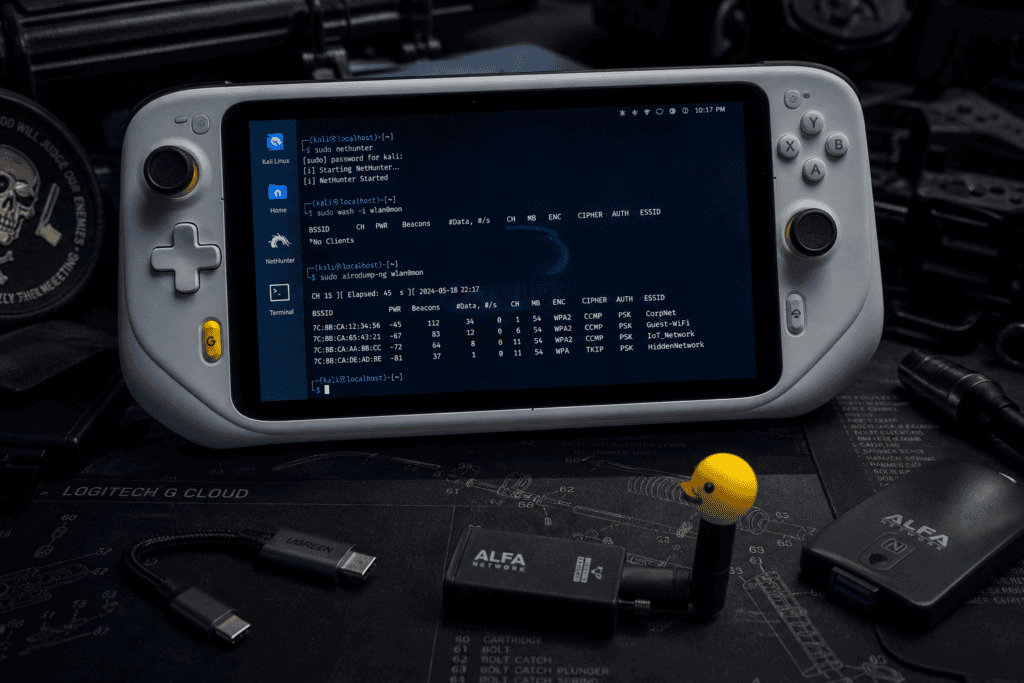
Nobody Expects the Handheld You walk into a physical security assessment. Badge cloned, door open. Now you need to run a quick network scan, maybe drop a persistence mechanism, pivot through a subnet. You pull out a laptop. Every camera in the building flags you. Every employee who glances over knows something is happening.
Or, you pull out what looks like a gaming handheld and pretend to play a game while Nmap finishes its sweep.
That’s the actual pitch for the Logitech G Cloud as a portable Android pentesting device. Not that it’s the most powerful tool in your bag. It isn’t. But that it’s the one nobody looks twice at.
The G Cloud shipped in late 2022 as a cloud gaming handheld, Nvidia GeForce Now, Xbox Cloud, that kind of thing. Logitech priced it at $350, built it around a Snapdragon 720G, gave it a 7-inch 1080p screen, a 6000mAh battery, and crucially, stock Android 11 that you can actually work with. The security community noticed. Because of course it did.
Android has always had a complicated relationship with security tooling. On one hand, it’s Linux underneath, close enough that porting tools isn’t insane. On the other hand, the fragmentation, the locked bootloaders, the OEM garbage layered on top… it’s a headache. The G Cloud sidesteps most of that.
Stock Android. Unlockable bootloader. No carrier bloat. No Samsung One UI nonsense sitting between you and root access. It’s almost suspiciously clean for a consumer device.
The Snapdragon 720G isn’t a flagship chip, it’s mid-range 2020 silicon. But for the workloads a portable Android pentesting device actually runs in the field, it’s more than sufficient. You’re not compiling kernels on this thing. You’re running scans, intercepting traffic, executing payloads, reviewing output. The chip handles it without breaking a sweat.
The battery is where it actually earns its keep. 6000mAh in a device this size, with a screen and processing load that’s significantly lower than gaming use cases, means you’re looking at 8–12 hours of real pentesting work depending on what you’re running. That matters enormously when you’re on-site and can’t exactly plug in at someone’s reception desk.
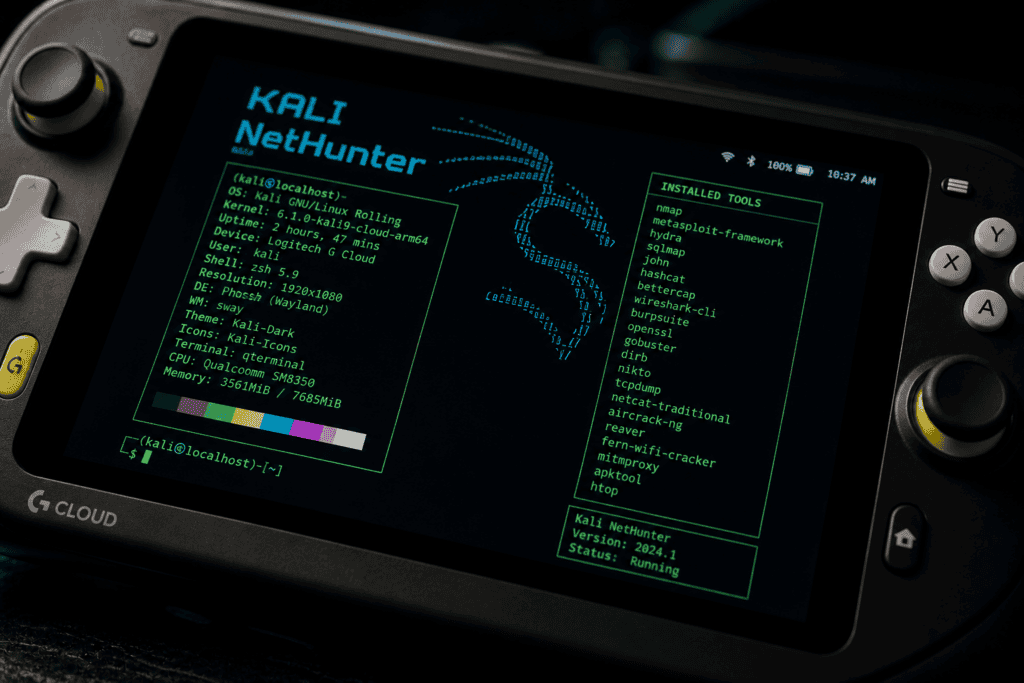
Kali NetHunter is the obvious choice here, and yes, it runs on the G Cloud. But let’s be precise about what that actually means before you order the hardware expecting a Kali laptop in handheld form.
There are three NetHunter deployment modes: full ROM flash, NetHunter Lite, and the rootless edition. For the G Cloud, you’re most likely working with NetHunter Lite or the full image if you’ve unlocked the bootloader and flashed a custom recovery, typically TWRP. The rootless version works without unlocking anything but loses most of the interesting capabilities. If you’re doing this seriously, unlock the bootloader. That’s the first step and there’s no real alternative.
The official Kali NetHunter documentation has device-specific build tables, and while the G Cloud isn’t explicitly listed as a first-class supported device, the community has ported it. The process is close enough to generic Snapdragon 7-series builds that an experienced flasher won’t hit anything unexpected. Expect to spend 2–3 hours doing this properly, not 20 minutes.
Once you’re in, the NetHunter app gives you terminal access, the Kali chroot environment, and a decent launcher for your tools. The chroot is where the real work happens, a full Kali Linux userspace sitting on top of Android, giving you access to the full toolchain.
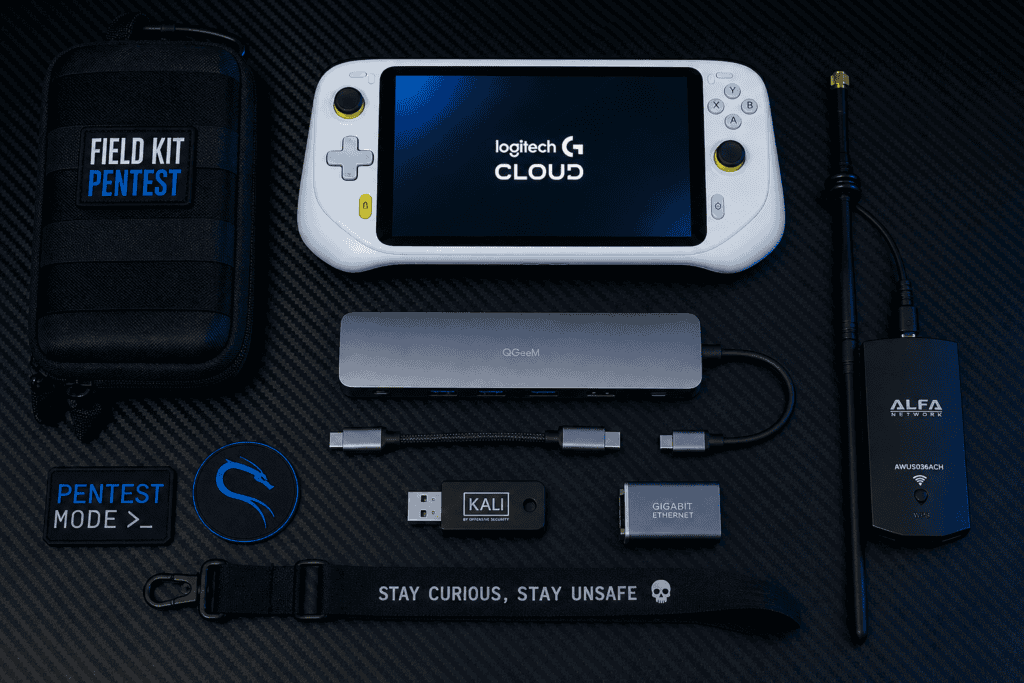
This is where the G Cloud’s gaming roots either help or frustrate you depending on your expectations. The device has a single USB-C port. That’s your charging port, your data port, and your OTG host port. You need a USB-C hub or OTG adapter to hang hardware off it, Alfa network adapters, Bash Bunny, a hardware implant, whatever your engagement calls for.
The good news: USB OTG works. Alfa AWUS036ACH has been confirmed working with NetHunter on similar Snapdragon platforms. The kernel modules matter here, you need monitor mode and packet injection support, and not every adapter plays nice with every NetHunter build. The AWUS036ACH and AWUS1900 are the safe bets. The TP-Link TL-WN722N (v1 only, the v2 and v3 use a completely different chipset and will waste your afternoon) also works.
The bad news: you’re now carrying a hub, an adapter, and cables. The sleek handheld suddenly has a USB octopus attached to it. Field reality versus field fantasy, this is the version nobody photographs for their blog post.
Let’s stop hedging and be direct about the real use cases where a portable Android pentesting device like the G Cloud earns its place in the bag.
Wireless assessments. Paired with a supported Alfa adapter, you have a fully functional 802.11 auditing platform. Aircrack-ng, Kismet, Wifite, they run. Monitor mode works. Packet injection works. You can run a WPA2 handshake capture and feed it to hashcat (locally if you’re patient, or pipe it to a cloud cracking rig if you’re not). MITRE ATT&CK T1557.002, ARP cache poisoning, is absolutely achievable from this platform with the right setup.
Network reconnaissance. Nmap with full scripting engine, Masscan if you need speed over stealth, Netdiscover for passive enumeration. The G Cloud’s screen size is actually useful here, a 7-inch 1080p display is legitimately readable for reviewing scan output, which is more than you can say for a phone.
Bluetooth auditing. The G Cloud has Bluetooth 5.1 onboard. NetHunter’s Bluetooth Arsenal tools, BlueMaho, btlejuice, gatttool, can work against it with the right configuration. BLE enumeration and GATT exploitation are increasingly relevant as IoT and building access systems proliferate. A mobile pentesting handheld that can handle BLE work without extra hardware is genuinely useful.
Web app proxying. Burp Suite doesn’t have an official Android arm64 build, but you can run it in the chroot via Java. It’s workable. Not comfortable, but workable. The more practical approach is running Burp on a laptop and routing traffic from the G Cloud through it as a proxy, useful for testing mobile app traffic in context. Or run mitmproxy directly on the device, which handles the form factor better.
Payload staging. The Metasploit Framework runs in the chroot. msfconsole loads. You can stage listeners, catch reverse shells, run post-exploitation modules. The Snapdragon 720G handles it, though complex multi-session operations will feel sluggier than a laptop. Manage expectations.
Here’s the honest reckoning: the G Cloud as a portable Android pentesting device is a precision tool, not a general-purpose workstation. The people who get the most out of it are the ones who understand exactly what engagement types it fits before they show up.
Physical security assessments with a social engineering component, the cover story holds. Wireless site surveys where you need hours of uptime and minimal footprint, excellent. Dropping a Raspberry Pi implant and using the G Cloud to verify connectivity, sure. Running a full web application assessment with dozens of browser tabs, Burp extensions, and notes? Use a laptop. Full stop.
There’s also the input ergonomics question. The G Cloud’s physical controls are designed for thumbstick-and-button gaming, not typing. The on-screen keyboard in landscape mode is functional but slow. A Bluetooth keyboard pairs fine and fixes this immediately, but again, you’ve now got extra kit. The Android security auditing gadget vision starts accumulating dependencies fast.
According to MITRE ATT&CK, initial access techniques are increasingly targeting wireless and physical vectors, T1200 (Hardware Additions), T1091 (Replication Through Removable Media), and wireless-adjacent techniques have all seen increased real-world use documented in enterprise incident reports over the past two years. The G Cloud fits neatly into an operator’s toolkit for exactly these attack surfaces. It wasn’t designed for them. That’s almost the point.
The G Cloud shipped on Android 11. Logitech pushed an Android 12 update, but the upgrade path for custom ROMs lags behind official releases, sometimes significantly. If you’re committed to running NetHunter builds, you’re partially at the mercy of community kernel maintainers. This isn’t unique to the G Cloud, it’s the tax every Android security platform charges. Budget time for it.
The obvious comparison is the Hak5 ecosystem, devices built explicitly for this work. The Pineapple, the Bash Bunny, the Shark Jack. These are purpose-built and they do their specific jobs extremely well. They’re not a portable Android pentesting device with a screen you can actually use in the field without a laptop.
The other comparison is a phone, a rooted Pixel running NetHunter is legitimately capable and even more discreet. But the 6-inch screen is genuinely limiting for extended work, and you’re sacrificing the battery advantage. The G Cloud’s screen-to-battery ratio is the differentiator.
The Raspberry Pi with a touchscreen is the third option people suggest. It’s more powerful and more flexible. It also looks like exactly what it is, a hacker device, the moment anyone looks at it. The G Cloud looks like a bored employee gaming on lunch break. That’s operational security with a form factor, and it matters.
{IMAGE PROMPT: Split composition image showing left side a Raspberry Pi with attached touchscreen labeled visually as ‘obvious’, right side a Logitech G Cloud blending in on a cafe table next to a coffee cup labeled ‘invisible’, dark moody lighting, infographic style with subtle red and blue accent lines, cyberpunk aesthetic, high contrast photography}
If you do physical assessments with a wireless component, and you want a single device that can cover network reconnaissance, wireless auditing, payload staging, and Bluetooth enumeration, while fitting inside a normal bag without raising flags, yes. The G Cloud is worth the time investment to set up properly.
If you’re looking for a replacement laptop for complex assessments, you’ll be disappointed. It was never trying to be that.
The portable Android pentesting device category is genuinely underserved by purpose-built commercial products. Most of what’s available is either a specialized single-purpose tool or a raw single-board computer that demands significant fabrication effort. The G Cloud sits in a real gap , consumer hardware, accessible price point, form factor that provides operational cover, Android base that the NetHunter ecosystem supports.
It works. Mostly. Until the USB OTG hub decides to renegotiate during a time-sensitive engagement — at which point you’ll say things that can’t be published. But that’s field work. You adapt.
The right gear doesn’t make a good operator. But the right gear in the right hands, on the right engagement, at the right moment — that combination is harder to put together than it sounds. If you’re thinking seriously about building out a mobile security toolkit, see what we carry — the hardware that ends up in serious operators’ bags tends to share a few common traits, and it’s worth knowing what they are.
